Saturday, July 16, 2016

Genius Hour for Library Aides

     Ever since hearing about Genius Hour at the Schools Without Walls Conference this past year, I have been intrigued about how best to implement it in the library.

     For those who might be unfamiliar with it, Genius Hour, also known as Passion Project(s) or 20% time was born in Google where engineers were given that percentage of their work week to develop ideas and innovations they were interested in.  This policy not only increased employee motivation and productivity, but it also led to innovations such as Google Mail and Google News.

    There are a few basic principles of implementing Genius Hour in a school setting:
-projects are student directed/selected based on their research into areas of interest
-students have a means to demonstrate progress
-projects must be documented/presented in some way

      This year, I posed this idea to my student aides:  what would you do if you had 20% of class time each week to work on a project of your choosing?  Students had to earn this privilege by displaying outstanding time management skills.  Those aides who met the standard were rewarded with Genius Hour as their second semester final project, while those whose time management skills were still emerging were assigned a more structured final project.

       Students were informed that they had qualified for Genius Hour and they were given about two weeks to research and select their ideas.  We had to have some discussions about what would qualify as a Genius Hour project and emphasize the need for there to be some sort of product and documentation of their efforts.  This lead to some funny conversations about what would be an appropriate Genius Hour project and what would not be.  (For example, texting your girlfriend or playing a video game for 20% of class time would not meet the Genius Hour criterion :) )

     Student aides came up with an impressive array of projects:

     One student had a passion for teaching.  She had worked with the pre Kindergarten program in our junior high throughout the year on various projects.  For her project, she researched and taught pre-K students to make play dough.

     One student had a passion for computers.  He developed his coding skills through working in the library this year and was eager to expand his knowledge of how computers work.  His project was to take apart a computer, and then rebuild it in a cardboard box.  Since he used an enormous, old desktop, he named his project "Megalodon."

     One student had a passion for video production.  She had already worked on several video projects using i-Movie, including a book trailer and an informational video.  As a result, she was ready to move in a different direction.  For her project, she created a stop action video story on a whiteboard.

     One student had a passion for singing and video production.  He chose to create a video advertisement for our school's Karaoke club.

     One student had a passion for gaming.  He chose to build a Pokemon rom hack where he redesigned a section of the Pokemon world.


     Looking back, I am proud of the array of projects students created.  I observed the same spike in motivation and productivity from my student aides as they worked on their projects that Google executives observed.  (There was even one student aide who attempted to sneak out of other classes to come back to the library to work on his Genius Hour idea!)

     In the future, I look forward to providing more opportunities for Genius Hour through the library.  Students each presented their projects informally to library staff.  Next year, I hope to support students in more extensive documenting of their work perhaps through video or presentations to the school and the community.

     This experience also got me thinking about how Genius Hour could be applied to the classroom.  I look forward to exploring this during the upcoming school term with my teachers!

Follow me on Twitter:@brian_librarian

Follow the Golden Eagle Library

On Twitter: @GoldenEagleLMC

On Instagram: @Goldeneaglelmc

Contact me by email: bjohnson3@sdale.org


Wednesday, July 13, 2016

8 Keys to Having a Successful Teen Tech Week Celebration

     It has been one of my goals this year to hold more themed events based on the ALA Library calendar.  To be honest, at times I have let these events sneak up on me.  This has made me a little bit more dedicated to pulling some celebrations off.

    This year's Teen Tech Week has been a great celebration.  Here is a top 8 list of ways to have a successful Teen Tech and probably the suggestions here would apply to any library event.

1. Collaborate outside of your physical building.

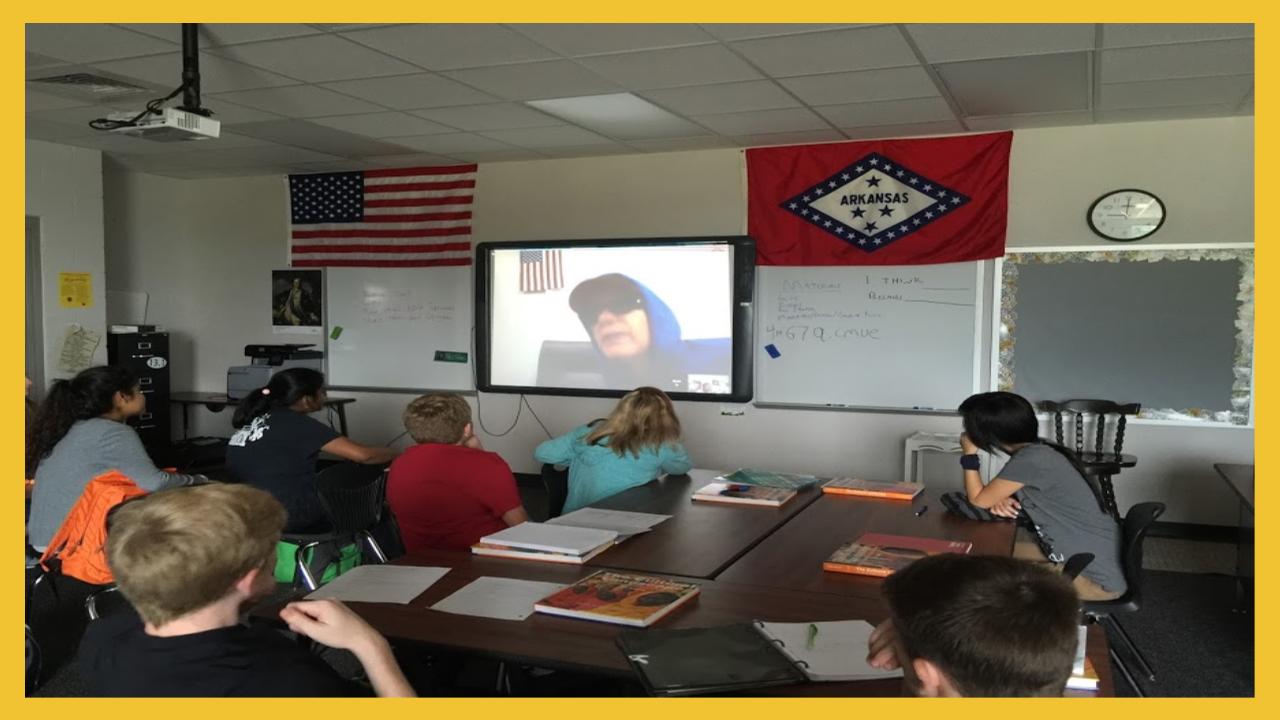
     For a couple of years now, I have had the privilege of staging Google Hangouts with my friend and colleague, Stony Evans at Lakeside Hot Springs High School.  We have had "Lakeside Squared" Hangouts based on books, Banned Book Week, and dramatic as well as musical performances.  For this year's Teen Tech Week, we decided to hold a Maker show and tell Hangout. Our students took turns sharing their maker creations including robots, coding, creature makeup and a windmill.

2. Seek out different demographics.

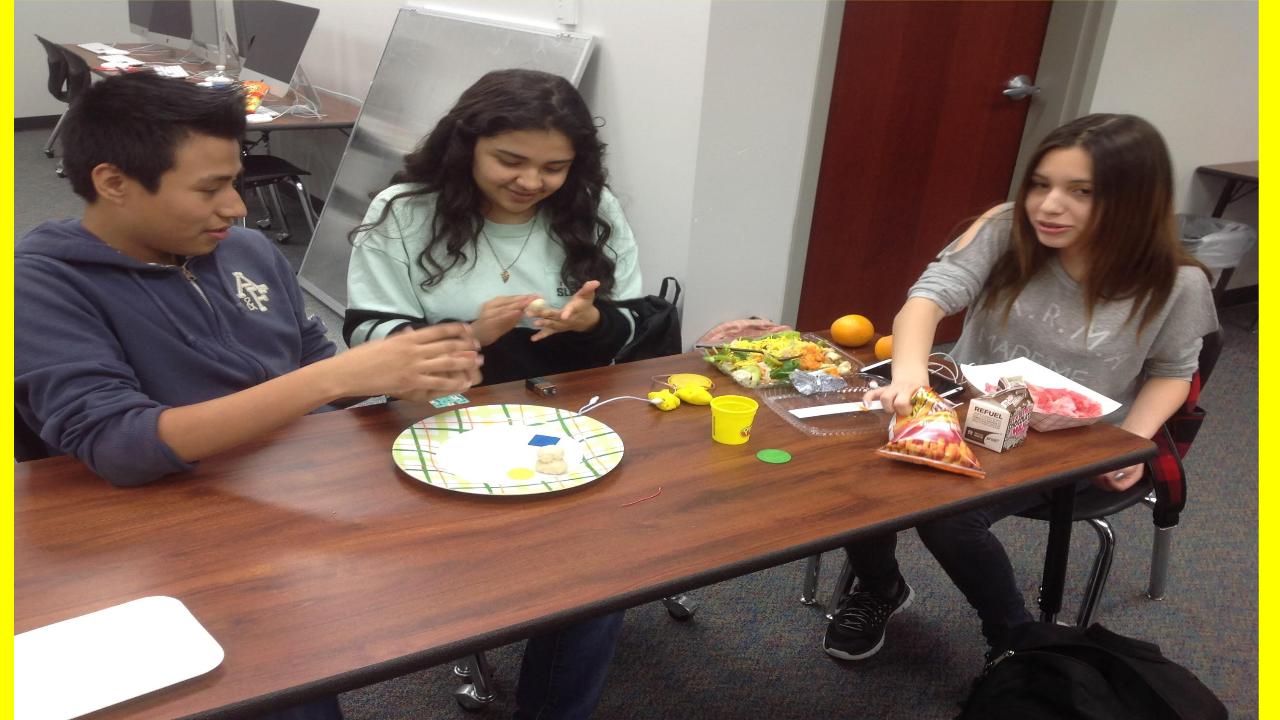
     Our libraries need to be safe places for all of our patrons and our programming should reflect that.  The Squishy Circuits session we held on Friday during lunch was a big hit with some of our male students who are typically "too cool" for library programs.  I am not sure if it was the electricity, or the play dough, or the combination of both that drew them in for this event.

3.  Hold a prize giveaway.

     Maybe this is a given at this point, but part of drawing in a larger crowd to library events is to give away candy and prizes.  For the Squishy Circuits event, we gave away a couple pairs of headphones, some candy and fancy pens.  They were a hit!

4.  Invite your staff to events.

     Since most of our students ride a bus to school, staying after school is not an option. As a result, most of the programming I present is either before school or at lunchtime.    This year, I have made it a point to invite both staff and students to events that traditionally have targeted students.  For the Squishy Circuits maker challenge on Friday, I had some teachers attend and build the circuits right along with students.  (Thanks to Mr. Scott and Mr. Stallings for participating!) It provides a great opportunity for teachers and students to interact outside of the classroom.

5. Collaborate with your teaching peers to present programming-look for ways to get them involved.

     One reason why Teen Tech week was so successful was the help and support I received from my faculty to develop the event.  Our Family and Consumer Science teacher, Mrs. Coston, also let me borrow her kitchen to mix up the non conductive Playdough that was needed for the Squishy Circuits.One of our instructional assistants Mr. Lara took pictures of the Maker Hangout and Squishy Circuits events.  He also kept participants well supplied with materials during  the Squishy circuits event on Friday.

6. Collaborate with student aides as coaches/tech mentors

     Before each Maker Challenge, I employ my student aides to test/troubleshoot the activities.  Not only does this get their buy in to attend the event, but they also recruit a few of their friends to attend which improves out turn out.   Trying out the maker activities ahead of time also gave them the confidence to go and teach others.   Since they have played the roll of activity testers before, several of them have made it a norm to not only attend the event, but also to jump right in and teach their peers at the event.

7. Subtly embed learning in the event.

     Aside from the fun of completing a Maker Challenge, I also look for ways to embed teachable moments.  For the Squishy Circuits challenge, students had lots of fun building circuits of out Playdough, but they also were learning some basic skills about how electricity flows. One of the concepts was the idea that they could build a short circuit-that electricity flows through the path of least resistance if the conductive dough pieces were touching instead of flowing through the wires.

     Students also had opportunities to try out a motor, different battery sizes as well as both alligator clips and wires.  Having a variety of materials on hand encouraged students to experiment and innovate.  This only added to the fun as students searched for the best combinations of batteries and cabling.  The students were so engaged in the fun of building the circuits that they did not realize that they were learning!

8. Reflect on the event and seek improvements

     Overall, the two Teen Tech week events were a success, but there are still areas that could be improved. For the Squishy Circuits, it would have been more effective to have sections of wire precut before students arrived for first lunch.  This would have given students more chances to innovate their designs.  For second lunch, we were able to have enough wire precut for students to start right away. This gave students more time and they developed some pretty innovative designs-they made a snake, an ugly snowman, and a fish!

     It also would have given students more confidence if there were some prototypes laid out to help them start thinking about their designs.  Next time, I would like to employ my student aides to help develop more prototypes and have their work laid out on the tables for event participants to see.   This would also help to prepare student aides to have more confidence to teach once they had already developed some working prototypes.

Follow me on Twitter:@brian_librarian

Follow the Golden Eagle Library

On Twitter: @GoldenEagleLMC

On Instagram: @Goldeneaglelmc

Contact me by email: bjohnson3@sdale.org

Sunday, July 3, 2016

Reverse Modeling: Teaching with Nonexamples

     I have a confession to make, I love Google Hangouts.   In past years, I have held Hangouts with authors and about books (both banned and not), in both English and Spanish, with experts in their field and some performance based Hangouts.

     Last year, I held some Mystery Hangouts with classes in the Caribbean, Sweden, Canada and South America for students in the Advanced Placement Geography course at my school.  (These Hangouts were also open to all students at Lakeside JHS).  They were so popular, that the AP Geography teacher approached me about holding them on a more regular basis this year.

     To teach our students Google Hangout etiquette, we decided to try start with a mock Mystery Hangout.  I called the class on Hangout from the library while they stayed in their classroom down the hall using my alter ego, Mr. Bond.  We employed one of my favorite instructional strategies teaching with nonexamples;  in the case of this Mystery Hangout etiquette lesson, what not to do on a Google Hangout.

    For this Hangout, I sketched out a fake class on the whiteboard behind me complete with distracted students.  We set it up in the Professional Library area of the library with an American Flag in the background so as not to disguise my location for a Mystery Hangout.

     Throughout the Hangout, I pretended that I could not sit still to reinforce how distracting such behavior is for participants on the other end of the webcam.  I also made sure to eat potato chips and drink water while attempting to answer students' questions about my location.

     Looking back on the year of Hangouts, the visit with Mr. Bond produced great dividends evidenced by students' participation in our later Hangouts.   This was quite a successful year for Mystery Hangouts.  We met with classes in South American, Europe (South London), British Columbia and Ontario Canada as well as Transylvania, Romania).

     Since students became comfortable in what not to do, they were better prepared to successfully participate.  Students were able to apply their learning to speak up, hold still, and ask the right kinds of questions during Hangouts.  They were able to develop deeper questions for those who participated in Hangouts with them which in turn, produced higher quality discussions.  Being that this is an election year, we had some fascinating discussions after the Mystery portion of the Hangouts with our peers on other continents about their views of American political candidates.

     Beyond deeper discussion, it also changed students' view of themselves and their roles in the world.  By holding a Hangout once a month with this class throughout the year, Hangouts became a norm of their education, and as a result, students started to view themselves as a part of the global community.

     We often hear that as educators we are preparing students for a world with jobs that have not yet been created.  Since we know our world is only becoming more connected, it makes sense to build in Hangouts as a norm of our instructional program.   Why not use regular Hangouts to prepare our students for their even more connected futures?

Follow me on Twitter: @brian_librarian

Follow the Golden Eagle Library!

On Twitter: @GoldenEagleLMC
On Instagram: Goldeneaglelmc

Contact me by email: bjohnson3@sdale.org

Friday, June 24, 2016

Let's Recap App: a Powerful Incubator of Reflection

      During the Arkansas Association of Instructional Media conference this spring, I heard from Joyce Valenza, one of my library heroes. One of the ideas that has stuck with me from her presentations was the need to publicize the library program with more than just usage statistics.  She proposed that including student feedback in library reports could deepen students learning through reflection and provide powerful documentation about the impacts of the library program on their learning.


Recently, while I was discussing authentic reflections with one of my colleagues, Justin Hart, he mentioned an app called (Let's) Recap. Mr. Hart joked that he would keep mentioning it until one of his colleagues went out and tried it.  I took him up on his offer and try it out with my student library aides this spring.  

Let's Recap is available on the Apple Store or it can be accessed on a computer. (https://app.letsrecap.com/)  Students can access the app either with their email, or by entering a class pin.  For my students, I had them enter a pin.


     For this experiment, I wrote up a few reflective questions for my student library aides to answer about what they had learned working in the library this year. Initially, I gave them the option to either write down their answers and submit them or complete a video reflection using Let’s Recap.  I anticipated that some student aides would volunteer to share their reflective thoughts on camera using the Recap app.  I was wrong.  Instead, every student submitted written responses to the reflective questions.

Since the written responses were limited and lacked depth, the next day I rethought this reflection activity, and decided to give them another opportunity.  I rewrote some of the questions and required students to complete their reflection on their learning using the Recap app.


I was pleasantly surprised by not only the amount of feedback students' Recap presentations provided, but by the depth of their reflective thoughts.  Some aides focused on the skills they had learned working in the library this year such as shelving books, time management, or ways they had built their customer service skills.  Other described the activities they had done such as working on Genius Hour projects in the Maker Lab, or the coding they did of Finch Robots and to build video games.


One student's reflection was particularly poignant.  This student was one of the more shy student aides this year.  Their reflection focused less on activities, or skills that were developed, and more on how they had grown as a person through working in the library.  In the Recap reflection, they described how they had "learned how to talk with people" and "be more social" working in the library this year.


Some things I liked about the Let's Recap app:
  1. Ease of use-it is not difficult to set up reflection opportunities using the app or to review student responses.
  2. It provides more authentic feedback opportunities since students are talking out their thoughts.  This proved more effective for some students.  For others, the lack of structure provided through oral explanation led to more of a "stream of consciousness" approach.
  3. Some students shared about class learning and skills they developed, while others shared about personal growth.
  4. Students were in some cases more frank and honest when they talked out their reflections compared to when they reflected on paper.
     5. Let’s Recap is free and works as an iPad app, or on computers.

As I look forward to the 2016-17 school year, I will definitely be including Let’s Recap as one of the apps that will be shared through the Digital Diner technology trainings I offer for my staff.  It will be one of the first apps I share this fall. It is a great, easy to use reflective tool that can powerfully display students' reflections on their learning.

Follow me on Twitter: @brian_librarian

Follow the Golden Eagle Library!

On Twitter: @Goldeneaglelmc
On Instagram: @Goldeneaglelmc

Contact me by email: bjohnson3@sdale.org

Tuesday, April 12, 2016

AAIM 2016 Reflections-Coming Home

     This year's Arkansas Association of Instructional Media conference was held in Springdale, Arkansas, the town where I teach and have lived for the last 15 years.  I am so grateful to have had the opportunity to learn and grow at this conference.  As I look back on this conference, I could not help but feel like I had come "home" to the conference.

     Home is a place of fellowship.  It was great to see several of my colleagues from around the state including Misty Bell, Stony Evans, Erin Shaw and Dr. Traci McAllister.  I enjoyed an early morning run with Stony Evans while the sun came up where we discussed some of our next Lakeside Squared Hangout ideas.  Copresenting with Stony Evans and Ashley Cooksey on how to participate in a Tweet chat was another highlight.  I look forward to holding a Digital Diner training at Lakeside for my teachers on the possibilities of Twitter.  It was also a great opportunity to present with several published authors and professors on best
practices for being published.

 Another highlight was seeing my colleagues at the session I led on how to develop 3D video game simulations using AgentCubes software.
I was also grateful for the chance to enjoy an evening meal with the librarians from Hot Springs and Bauxite Public Schools We were able to pick each other's brains about topics such as National Board Certification, collaboration, maker spaces, and scheduling.

      Home is a place for challenge and inspiration.  I was challenged at the AAIM conference by speakers to research how to incorporate social media into a book club.  The speakers at the conference also challenged me to give further chances for our students to find their voice in our libraries.  I am eager to expand these opportunities for my students.  Some chances for students to find their voice have come about through the opening of the Lakeside Maker Lab this past fall.  Even now, students at Lakeside are starting to come into the library before school and at lunch to continue building and tinkering with projects they have started in their classes and the Lakeside Maker Club.  I am eager to continue this work!

      Another way I was inspired was to improve the accessibility of library materials for the parents of my learning community.  I plan to develop a parent page on the library website to more effectively share with parents all the resources available through the Lakeside Library collection.   I was also challenged about the types of data I present to my library community.  In the past, I have included lots of statistics about visits to the library and circulation data. As a result of attending the conference, I plan to include more student responses in my bimonthly reports.   I was also challenged to consider ways that I can further use social media to encourage reading.  In response to this challenge, I have already posted photos of book displays on the LJHS Library Instagram account.  Next year, I look forward to exploring the role social media can play in the Lakeside Book Club.  (LBC)

      Home is also a place for reflection.  I heard from Dr. Joyce Valenza, one of my heroes of the library world since graduate school. She challenged us to about how we work with our students to develop their digital footprint.  We had a conversation after her session on how to encourage students' to develop a positive digital footprint.  I was inspired to adjust my teaching on digital literacy to include more encouragement for students to develop both social and the academic side of their digital footprint.

     Dr. Valenza also reminded us how important it is to encourage students to use media appropriately.  I am eager to try her suggestion to have students create an annotated bibliography of their sources using Thinglink. (www.thinglink.com) later this semester.  She also encouraged us to increase our students awareness of Creative Commons media.  I was inspired to continue to push the use of Creative Commons media in my co-teaching opportunities and to have students add Creative Commons licensing to the digital media projects they create at Lakeside.

   
 Jennifer LaGarde encouraged librarians to use social media to promote our programs.   One way I plan to implement this encouragement is to expand my posts on the Lakeside Junior High School Library Twitter and Instagram accounts.  My goal is to post at least once a day on social media.  She also encouraged Macguyer Librarianship: seek out creative opportunities to decorate my library as well as implement additional maker projects and special events.

     Another Arkansas Association of Instructional Media Conference is in the books.  I can't wait to gather again with great guest speakers and colleagues to renew friendships and continue to celebrate and implement the great work being done in libraries across Arkansas!


Follow me on Twitter: @brian_librarian

Follow the Golden Eagle Library!

On Twitter: @Goldeneaglelmc
On Instagram: @Goldeneaglelmc

Contact me by email: bjohnson3@sdale.org

Saturday, March 19, 2016

Bracketology: Using the NCAA Basketball Tournament as a Literacy Tool

  Like many of us, I love March Madness: filling out a bracket, watching the games, rooting for the underdogs, enjoying the outstanding individual performances-it is truly magic!

     For years now, I have had my student library aides fill out a bracket just for fun.  We hold a contest to see who among the library staff can guess the most winners of the games correctly.  This past week, I had my students fill out a bracket again.  But this year my perspective changed.  Instead of just viewing the filling out of a bracket as a fun exercise,
I began to view it as a literacy opportunity.

     As I presented the bracket opportunity to my students this spring, I was struck by how many did not know how to read a bracket.  I am not sure if this is because I have fewer student aides this year who are basketball players/fans than in the past.  That was out first lesson-how exactly do you decipher a bracket?  (After all this is a life skill right? - at some point their children may participate in competitions of all kinds where the results will be posted in a bracket)

     Filling out an NCAA bracket also has other literacy opportunities embedded within it.  As students fill out their brackets, they can learn new vocabulary terms such as seeds, regional, mid-major conference, and even RPI (Ratings Percentage Index-in other words: how did a team fare against other good teams in the regular season?).

     Bracketology also gives us as educators chances to differentiate instruction for our learners.  Students will need to check the results almost daily to update their brackets.  Which websites are the best sources of information?  How do I read information on these websites?  Aside from the scores, what statistics can help me to understand why this team won against a particular opponent?

      For students who are ready to go deeper, research opportunities abound: how does the NCAA figure out the seeded teams and who plays who? Why does... team with a better record have a lower seed than ... team?  What types of players/styles do the different teams play and how does this impact the results?  Does it matter that ... team has no players on its roster that are taller than 6 foot 5 inches, or that all of their starting players are seniors?  Historically, does .... team usually play better against.... team and why is that?

     Working with my students this year to teach them about filling out a bracket for the NCAA tournament ended being an unexpected literacy opportunity.  I wonder what other unexpected literacy opportunities we can utilize as teachers/media specialists to further equip our students as effective users of information in the 21st century world?

Follow me on Twitter: @brian_librarian

Follow the Golden Eagle Library!

On Twitter: @Goldeneaglelmc
On Instagram: @Goldeneaglelmc

Contact me by email: bjohnson3@sdale.org
Saturday, February 20, 2016

Keep on Making: Reflections on How the Hour of Code Changed the Library Culture

     This past fall in honor of Computer Science Education Week, I held an Hour of Code celebration.  It was well attended about 40 students and 1 teacher participant.  I have intended to blog about what I learned from this experience for several weeks,  but it is only now that I have started to see the more profound, long term impacts this event has had on the culture in my library.

    I promoted the Hour of Code event this year with the green screen in the Media Makerspace room.  The green screen gets used frequently by teachers and students for video projects, but this was the first time I had used it to create a still production.  In keeping with the theme of Star Wars, I borrowed some action figures from a colleague, located some Star Wars font online for the background and combined the two to post Made the Code Be With You to promote the event around the school.


     The Hour of Code event lead to more collaboration with our EAST (Environmental and Spatial Technology) program.  They were running a social media campaign during Computer Science Education Week to have students post selfies with their completed Hour of Code certificates with #LJHShourofcode.  The library supported this campaign by giving students time during their lunch period on Friday of that week to complete the Hour of Code and post selfies to social media showing their successes.


     Although the Hour of Code was not the first special event that the library has held, it has further shaped this culture.  Even the next class period after the event, students were already asking if they could come back and "do more coding" during their lunchtimes.  This has led to a steady stream of students who now come to the library at lunch to continue building their coding skills.  The Library Classroom has evolved into a drop-in coding station. Students here are coding the Finch Robots we have on loan this year at Lakeside.


 Hosting the Hour of Code was also a leadership opportunity for my student library aides. They had gone through the Hour of Code earlier in the fall and had the opportunity to serve as "code Jedis" for their "code apprentice" peers during the event.  I first heard about the power of student led technology learning events from my friend Stony Evans, but this was my first experience with it.  It was such a success that I look forward to holding another student led technology event soon!


Follow me on Twitter: @brian_librarian

Follow the Golden Eagle Library!

On Twitter: @Goldeneaglelmc
On Instagram: @Goldeneaglelmc

Contact me by email: bjohnson3@sdale.org