Sunday, May 31, 2020

Monday, May 25, 2020
Sunday, May 24, 2020
Silent Book Club: An Easy Way to Provide Virtual Services During Crisis (or Really anytime!)
During the COVID-19 Crisis, we have certainly had to shift our instructional practices to meet the needs of our learning community in these crazy times! My initial interest in Silent Book Clubs came from hearing from my colleague Ginny Poepsel (vpoepsel@sdale.org) in Springdale that a student had requested a time/space online to just be in the presence of others to read.
After reading Cassandra Barnett's message to the Arkansas Association of Instructional Media about the Silent Book Club a few days later, I decided to give it a try. The first session of the Lakeside Silent Book Club was held on Zoom during a week when our virtual book club was to meet with the author of the book we were reading. When the author cancelled, I decided to give the Silent Book Club a try.
I promoted the event on the LJHS Library social media through some posts including a media found below:

How It Went
For our initial Silent Book Club, we had four participants. Although no student participants attended, four staff members attended. Probably the most awkward thing about the Silent Book Club, was understanding the norms. Since it was a "silent" book club, it was a bit unclear for the participants when, if at all, it was okay to talk. I opened the meeting by asking participants to hold up the book they were reading on screen so other participants could see what was being read.
To accommodate the silence, we ended up using Zoom's chat feature to share briefly about the books we were reading. One positive of the experience was that there was a definite reading "flow" that took place. Our meeting was originally scheduled from 2-3pm, however each member of the group was so engaged in their book, that I did not end the meeting until almost 3:15. (Likely if I had not said anything, I think the meeting could have gone on even longer!)
Future Implementation
Even though no students attended, I would still say that the goal of providing a safe space to read online was met. I think if I had advertised the meeting more and as students get used to this opportunity as a regularly scheduled library event, its popularity will continue to grow.
As I look towards the uncertainty of the fall, whether we continue with virtual instruction or will be back in face to face school, I would definitely be interested in holding Silent Book Club meetings in the future. Try it out virtually, or in your physical library space and please let me know how it goes!
Contact me on social media: @GoldenEagleLMC
@Brian_librarian
Bjohnson3@sdale.org
Wednesday, July 25, 2018
Invention Literacy Challenge
It is easy to get nostalgic over the summer about where the library program has been and where it will go in the future. Looking back on this past school year, it started with a summer challenge at a training. Where that challenge ended up was surprising and opened up an entirely new world of possibilities.
Last summer, I attended the Arkansas Library Association (ARLA) summer conference in Little Rock, Arkansas. In addition to having the privilege of presenting and renewing some professional contacts, I also got to learn about a concept that was new to me from the keynote speaker Colleen Graves. She shared with us about a concept called Invention Literacy.
 At it's core, Invention Literacy asks students to invent and innovate, but it also asks them to chronicle their journey of learning. They are to do this through a variety of means including research as well as keeping a journal of their successes and failures as they build, innovate and invent. At the end of her last keynote, Colleen Graves challenged us to take one piece of learning from the ARLA conference. She asked us to write it down and store it somewhere we could refer to during the year. Her challenge was to implement that one piece of new learning from the conference in the upcoming year.
I selected the topic of Invention Literacy with the goal of collaborating on at least one Invention Literacy project during the 2017-18 school year. I wrote down the term Invention Literacy on a post-it note and stored it in the top pocket of my backpack.
As I returned for the new school year, I began sharing my learning with my teachers and proposing some ways we could implement Invention Literacy. Additionally, I also loaned out some maker space materials to teachers as a way for them to begin to see the power of Invention Literacy and how tools such as LittleBits could be used to make Invention Literacy a reality.
 In March, a new teacher approached me about a possible idea for an Invention Literacy project. She is 8th grade American History teacher and was about to start a unit on the Progressive Era. Ms. Powell proposed that students could do research about an invention from that era and create their own sample of the invention.
To start, we scoped out a handful of inventions of the time including the airplane, elevator, telegraph and railroad. Our essential question was: how does....(invention) work and how can I make my own version of it? In order to get students thinking in an invention mindset, I led them through two days of invention challenges with the Makey Makey.
 By the end of the third day, student groups had to make a decision about which invention from the Progressive Era they were planning to make. Even though Ms. Powell and I created a short list of possible inventions, students' creativity soon began to emerge in unexpected ways. Although there were some airplanes and telegraphs, students greatly expanded the list. Among their inventions were a paddle boat, an assembly line, and a number of medicines which were created during the Progressive Era.

Three other amazing inventions were a teaching tool for children who could not go to school since they were already working, a vacuum cleaner, and a vending machine.
One thing that turned out differently about the project was the way research was done. Initially, I had proposed that students would do the research into their invention's history first, before they did any building. As it turned out, we had students build for a couple of days first and then do research. This helped to build in some buy in from students are they were more motivated to research into their inventions once they had spent some time building their designs.
Advocacy
 One of the best things about this project was the advocacy piece it became for the Library program and the Maker space specifically. My administrative team asks us three questions in our springtime summative evaluation: what have you done well this year what do you want to improve on, and how can we as a building improve next year. In my summative evaluation, I shared with them about the success of the Invention Literacy project. Ms. Powell had arranged for her students to complete a gallery walk in the library where they could share their process and projects which just so happened to be going on during the time of my summative meeting. So I invited my administrators to see these students incredible work.
We also had the great opportunity to hold a Google Hangout with Stony Evans from Lakeside Hot Springs High School.in Arkansas. He is the librarian there and had been collaborating with one of his history teachers on a similar Invention Literacy project. Our students had a chance to share their projects/process with their peers from Hot Springs. The Hangout was also a wonderful chance to look into ways we can expanded Invention Literacy into the future. We saw several projects that had reinvented historical locations through designing Minecraft worlds. Among them were a slave plantation and Fort McHenry in Baltimore Harbor where Francis Scott Key had penned the Star Spangled Banner.
 Our Invention Literacy project turned out better than I could have ever imagined. It was exciting to watch student grow as inventors and innovate with their projects. I am eager to add other possibilities such as designing historical Minecraft worlds to future incarnations of this project. In fact, another 8th grade history teacher has already approached me about collaborating this year on an Invention Literacy project. I can't wait!
Follow me on Twitter: @brian_librarian
Follow the Golden Eagle Library!
On Twitter: @GoldeneagleLMC
On Instagram: GoldenEagleLMC
Contact me via email: bjohnson3@sdale.org
Last summer, I attended the Arkansas Library Association (ARLA) summer conference in Little Rock, Arkansas. In addition to having the privilege of presenting and renewing some professional contacts, I also got to learn about a concept that was new to me from the keynote speaker Colleen Graves. She shared with us about a concept called Invention Literacy.
 At it's core, Invention Literacy asks students to invent and innovate, but it also asks them to chronicle their journey of learning. They are to do this through a variety of means including research as well as keeping a journal of their successes and failures as they build, innovate and invent. At the end of her last keynote, Colleen Graves challenged us to take one piece of learning from the ARLA conference. She asked us to write it down and store it somewhere we could refer to during the year. Her challenge was to implement that one piece of new learning from the conference in the upcoming year.
I selected the topic of Invention Literacy with the goal of collaborating on at least one Invention Literacy project during the 2017-18 school year. I wrote down the term Invention Literacy on a post-it note and stored it in the top pocket of my backpack.
As I returned for the new school year, I began sharing my learning with my teachers and proposing some ways we could implement Invention Literacy. Additionally, I also loaned out some maker space materials to teachers as a way for them to begin to see the power of Invention Literacy and how tools such as LittleBits could be used to make Invention Literacy a reality.
 In March, a new teacher approached me about a possible idea for an Invention Literacy project. She is 8th grade American History teacher and was about to start a unit on the Progressive Era. Ms. Powell proposed that students could do research about an invention from that era and create their own sample of the invention.
Implementation


One thing that turned out differently about the project was the way research was done. Initially, I had proposed that students would do the research into their invention's history first, before they did any building. As it turned out, we had students build for a couple of days first and then do research. This helped to build in some buy in from students are they were more motivated to research into their inventions once they had spent some time building their designs.
Advocacy

We also had the great opportunity to hold a Google Hangout with Stony Evans from Lakeside Hot Springs High School.in Arkansas. He is the librarian there and had been collaborating with one of his history teachers on a similar Invention Literacy project. Our students had a chance to share their projects/process with their peers from Hot Springs. The Hangout was also a wonderful chance to look into ways we can expanded Invention Literacy into the future. We saw several projects that had reinvented historical locations through designing Minecraft worlds. Among them were a slave plantation and Fort McHenry in Baltimore Harbor where Francis Scott Key had penned the Star Spangled Banner.

Follow me on Twitter: @brian_librarian
Follow the Golden Eagle Library!
On Twitter: @GoldeneagleLMC
On Instagram: GoldenEagleLMC
Contact me via email: bjohnson3@sdale.org
Tuesday, July 24, 2018
Friday, May 4, 2018
Maker Space Failures
There are many posts written about successful Maker space activities. I wanted to write a post about a recent Maker space failure. One idea I have wanted to try for a long time was to build a wind tunnel. I had a roll of material that looks like lamination, but was not, and several type of tape to hold it together. I purchased some dowel rods and had a mound of donated cardboard to use for supports. We looked at pictures and models. We had all the materials and a plan; I thought we were primed for success.
 Students attempted to build a wind tunnel, and created some flying objects to test in it. Not a single object even flew! But they loved it! A group of 8 students who had not participated in our Library's Maker program came out and for the entire 30 minute block of time they build and rebuilt their flying machines-even though not a single one of their creations left the ground.
We are in the midst of testing season, teachers were asked to develop a series of fun activities for the afternoon of the last day of testing. I decided to offer the wind tunnel session one more time. A different group of students attended, and we looked at some more pictures of wind tunnels, agreed on a plan and began to build.
 Things went much differently this time. All students jumped in to create wind tunnels. There were two fans-one small circular fan and a larger box fan. Most students formed a large group and chose to use the larger box fan for their wind tunnel. One student decided to create his own design on the side using the smaller fan.
We had one student who immediately moved off to the side. She is a talented artist, and is a little shy. On her own, she sketched up a plan of what a working wind tunnel would look like.
In spite of the initial lack of success, I would definitely call the wind tunnel project a success on several levels:
1. Seeing the possibilities of making
 On the first day, 8 students who had not signed up for Maker space activity this year did. They were engaged in building flying objects for the duration. They now understand the possibilities and fun of making! I anticipate that I will see them again for upcoming Maker space activities
2. The power of student choice in making
I had originally thought that there would be one large group all working together on the same wind tunnel. I was wrong. Instead, students formed groups that worked for them. Most students did choose to work in the large group, while one student created his own wind tunnel design. The other student self selected how she would make by sketching out how she thought the wind tunnel should look. She created a "space" for herself to participate.
3. The power of failure
 The fact that our first wind tunnel project had no flying objects leave the ground helped to build resilience in the student makers. It did not deter them from continuing to try. The perceived failure of the first day, also empowered me as the instructor to rethink some components of the project and schedule to try it again. We actually started the second day's attempt by looking at the earlier failed designs.
Evaluating these failures powered our later successes!
What failures have your experienced in your Maker programs and how have they been turned into successes?
Check out our successful launch below!
Follow me on Twitter: @brian_librarian
Follow the Golden Eagle Library!
On Twitter: @GoldeneagleLMC
On Instagram: GoldenEagleLMC
Contact me via email: bjohnson3@sdale.org

We are in the midst of testing season, teachers were asked to develop a series of fun activities for the afternoon of the last day of testing. I decided to offer the wind tunnel session one more time. A different group of students attended, and we looked at some more pictures of wind tunnels, agreed on a plan and began to build.
 Things went much differently this time. All students jumped in to create wind tunnels. There were two fans-one small circular fan and a larger box fan. Most students formed a large group and chose to use the larger box fan for their wind tunnel. One student decided to create his own design on the side using the smaller fan.
We had one student who immediately moved off to the side. She is a talented artist, and is a little shy. On her own, she sketched up a plan of what a working wind tunnel would look like.
In spite of the initial lack of success, I would definitely call the wind tunnel project a success on several levels:
1. Seeing the possibilities of making
 On the first day, 8 students who had not signed up for Maker space activity this year did. They were engaged in building flying objects for the duration. They now understand the possibilities and fun of making! I anticipate that I will see them again for upcoming Maker space activities
2. The power of student choice in making
I had originally thought that there would be one large group all working together on the same wind tunnel. I was wrong. Instead, students formed groups that worked for them. Most students did choose to work in the large group, while one student created his own wind tunnel design. The other student self selected how she would make by sketching out how she thought the wind tunnel should look. She created a "space" for herself to participate.
3. The power of failure
 The fact that our first wind tunnel project had no flying objects leave the ground helped to build resilience in the student makers. It did not deter them from continuing to try. The perceived failure of the first day, also empowered me as the instructor to rethink some components of the project and schedule to try it again. We actually started the second day's attempt by looking at the earlier failed designs.
Evaluating these failures powered our later successes!
What failures have your experienced in your Maker programs and how have they been turned into successes?
Check out our successful launch below!
Follow me on Twitter: @brian_librarian
Follow the Golden Eagle Library!
On Twitter: @GoldeneagleLMC
On Instagram: GoldenEagleLMC
Contact me via email: bjohnson3@sdale.org
Tuesday, August 1, 2017
The Golden Eagle Monthly Media Report for April-May 2017
Check out what was going on in April-May of 2017 in your Lakeside Junior High School Library!
G.E.M.M.
G.E.M.M.
The Golden Eagle Monthly Media Report for February-March 2017
Check out what has been going on in the Lakeside Junior High Library Media Center!
The G.E.M.M.
The G.E.M.M.
Monday, July 24, 2017
Stretching Out of Students' Minds with the Google A Week Contest
A couple of years ago, I attended a Google Summit in Conway, Arkansas with a group of teachers from my school. We left with a passel of ideas about how we could infuse our curriculum with Google Apps for Education. The two hour drive home featured a series of conversations casting a vision for what our school could be like if we implemented Google tools at Lakeside. Looking back on the conference, it was an event which has profoundly shaped how instruction is delivered at my school.
One of the concepts I learned about at the Google Summit was the Google A Day contest. In its original form, I would selected one of the questions from the Google A Day and use it for the Google A Week contest on my campus. The Google Question of the Week has evolved to focus on current events and curricular topics. It has become a popular addition to the daily announcement broadcast. Over time, the Google Question of the Week has become a staple of the library program.
How it works
Each Monday, a new question is posted on the daily school wide video broadcast as well as on posters throughout the school halls. Students have until Friday at the end of the school day to turn in their name, the correct answer, and the website where the answer came from on a slip of paper.
On Fridays, right before I leave for the day, I sift the answers and pile up the correct ones. Then one correct answer is selected at random as the Google a Week winner. Sometimes I will also enlist the help of a library patron who is present in the last period of the day to select the winner. The winner is announced on next week's campus wide video broadcast. Each week's winner is also entered in the Google A Week Championships (or G.A.W. CHA) which is held in the Spring each year. To read more about this event, check out this blog post about it. http://bit.ly/2eIZuHU
Frequently the questions are related to current events, topics students are studying in class or an obscure story I heard on public radio during my morning commute. I will often hear from students when they see the question-"we just talked about that in class the other day!" It ends up being a research opportunity even if they think they remember the answer since they are required to locate a web based source for their information. It also provides another opportunity for teachers and students to discuss what they are learning. This is also an easy way to document how we are supporting the school's instructional program as a library media specialist.
 Usually I will make adjustments from the original question to make it "unGoogleable". For example, I located the question: What was America's best selling book in 2016? To make this question "unGoogleable", I refocused the question to become: who was the main character of America's bestselling book in 2016?
By making this change, the question also became more difficult because students had to look into both fiction and nonfiction bestseller lists since each type of books could have characters. They also had to conduct deeper inquiry to determine who the main character of that work was.
Adjusting questions this way reinforces the research skills I want to cultivate in my students. Through the process of locating the answer, students are building reading stamina. Students sometimes have to look at multiple websites and go beyond just reading the "abstract" on their initial search. By doing this, they are building reading and research stamina that will help them to engage in more complex texts.
Instead of just typing in the question and locating the answer, I encourage the students to "cut the question like a steak." What I mean by this is to cut off the "bones and fat" (the unnecessary words) which develops their skills at identifying keywords to narrow their search and further limits their search results. My goal is that my students will be so familiar and comfortable with "cutting the question like a steak" that they will transfer this skills to attack the research questions which are posed in their classes in this manner.
The Future of Google a Week
In the future, I would like to grow the Google A Week program to include more faculty participation. Historically we have a few teachers and staff members enter the weekly contest. I think it would encourage more students to participate if they felt like they were competing against their teachers!
Another way I would like to grow the program is to further integrate it with database use. Not only would it give students more experience using the databases in the contest, but I also think this would go a long way to reinforcing the use of databases as students' "go to" research resource for projects in their classes. It might require a bit more work to develop questions that could only be answered using our state funded databases, but the long term impact might make it work it.
Follow me on Twitter: @brian_librarian
Follow the Golden Eagle Library!
On Twitter: @GoldeneagleLMC
On Instagram: GoldenEagleLMC
Contact me via email: bjohnson3@sdale.org
One of the concepts I learned about at the Google Summit was the Google A Day contest. In its original form, I would selected one of the questions from the Google A Day and use it for the Google A Week contest on my campus. The Google Question of the Week has evolved to focus on current events and curricular topics. It has become a popular addition to the daily announcement broadcast. Over time, the Google Question of the Week has become a staple of the library program.
How it works
Each Monday, a new question is posted on the daily school wide video broadcast as well as on posters throughout the school halls. Students have until Friday at the end of the school day to turn in their name, the correct answer, and the website where the answer came from on a slip of paper.
On Fridays, right before I leave for the day, I sift the answers and pile up the correct ones. Then one correct answer is selected at random as the Google a Week winner. Sometimes I will also enlist the help of a library patron who is present in the last period of the day to select the winner. The winner is announced on next week's campus wide video broadcast. Each week's winner is also entered in the Google A Week Championships (or G.A.W. CHA) which is held in the Spring each year. To read more about this event, check out this blog post about it. http://bit.ly/2eIZuHU
Frequently the questions are related to current events, topics students are studying in class or an obscure story I heard on public radio during my morning commute. I will often hear from students when they see the question-"we just talked about that in class the other day!" It ends up being a research opportunity even if they think they remember the answer since they are required to locate a web based source for their information. It also provides another opportunity for teachers and students to discuss what they are learning. This is also an easy way to document how we are supporting the school's instructional program as a library media specialist.
 Usually I will make adjustments from the original question to make it "unGoogleable". For example, I located the question: What was America's best selling book in 2016? To make this question "unGoogleable", I refocused the question to become: who was the main character of America's bestselling book in 2016?
By making this change, the question also became more difficult because students had to look into both fiction and nonfiction bestseller lists since each type of books could have characters. They also had to conduct deeper inquiry to determine who the main character of that work was.
Adjusting questions this way reinforces the research skills I want to cultivate in my students. Through the process of locating the answer, students are building reading stamina. Students sometimes have to look at multiple websites and go beyond just reading the "abstract" on their initial search. By doing this, they are building reading and research stamina that will help them to engage in more complex texts.
Instead of just typing in the question and locating the answer, I encourage the students to "cut the question like a steak." What I mean by this is to cut off the "bones and fat" (the unnecessary words) which develops their skills at identifying keywords to narrow their search and further limits their search results. My goal is that my students will be so familiar and comfortable with "cutting the question like a steak" that they will transfer this skills to attack the research questions which are posed in their classes in this manner.
The Future of Google a Week
In the future, I would like to grow the Google A Week program to include more faculty participation. Historically we have a few teachers and staff members enter the weekly contest. I think it would encourage more students to participate if they felt like they were competing against their teachers!
Another way I would like to grow the program is to further integrate it with database use. Not only would it give students more experience using the databases in the contest, but I also think this would go a long way to reinforcing the use of databases as students' "go to" research resource for projects in their classes. It might require a bit more work to develop questions that could only be answered using our state funded databases, but the long term impact might make it work it.
Follow me on Twitter: @brian_librarian
Follow the Golden Eagle Library!
On Twitter: @GoldeneagleLMC
On Instagram: GoldenEagleLMC
Contact me via email: bjohnson3@sdale.org
Thursday, April 13, 2017
Monday, January 2, 2017
Taking Half Chances for Our Students
The English Premier League (EPL) is the best soccer/futbol league on earth. It pits the best defenders against the finest attacking players from around the world. Because the stakes are so high, players are forced to take "half chances" at the goal. At any moment, even a brief opening can lead to a goal. I believe we have to approach our jobs as Media Specialists like we are EPL strikers to seek out and take these half chances for our students and teachers to benefit their instruction and learning.
This year, the Lakeside Book Club (L.B.C) opened during lunch. Students sign a voluntary contract to read a section of a popular YA novel each week and discuss the novel during lunch time. In return, students get to keep a copy of the book for their own to build their personal library or share with friends/family. Our goal this year is to read 4 novels in this fashion.
Before the L.B.C. reads a novel, we visit with a guest expert to get steeped in the vocabulary and terminology related to the topics discussed in the novel. Sometimes, we visit with a local expert, and sometimes we meet with an expert through a Skype visit, or Google Hangout.
To line up a guest expert for our first novel, I took one of those half chances. The first novel we are reading for book club this year called the Rule of Three by Eric Walters. I was listening to National Public Radio's show called Fresh Air. The speaker that night happened to be an anthropology professor from McGill University in Canada named Dr. Gretchen Bakke.
Although her background is anthropology, she was being interviewed on the program about her new book about the power grid issues/crisis. The content of the Rule of Three was a perfect match for Dr. Bakke's area of expertise! It is a dystopian thriller where the power grid fails all the power goes out across the global causing all sorts of unthinkable disasters to arise.
 So I took a half chance and emailed Dr. Bakke to see if she would video conference with us. Conveniently, she has her Wednesdays free from teaching obligations. We just so happened to be meeting for book club on ....Wednesdays. So because I took a half chance, 40 students in the book club got to become steeped in the issues of our current power grid and are now better prepared to discuss and read the Rule of Three, a novel about when the power grid is no more!
 I have been looking for ways to make library programming more student centered. Meeting with Dr. Bakke via Skype helped to make this a reality. During our first book club meeting the week before, I asked students to post questions on a Padlet that they had about the power grid and its issues. These questions were sent to Dr. Bakke ahead of our Skype visit and were used to drive the discussion.
Taking this half chance and contacting Dr. Bakke turned into a golden opportunity for my students. Not only did they learn the vocabulary and terminology related to the electrical power grid failing, they also were empowered to share and have their questions answered by a world renowned expert on the topic.

They also got to see the Growth Mindset in action. What if as media specialists this year we made it our goal to consistently model/embrace taking these "half chances" for our students and asking important "what ifs" about instruction and delivering our content? What kinds of incredible opportunities it could lead to for our students!
May that be our goal as this new year of 2017 begins!
Please share with me about how you are taking half chances for your students in 2017 and beyond!
Contact me:
Follow me on Twitter:@brian_librarian
Follow the Golden Eagle Library
On Twitter: @GoldenEagleLMC
On Instagram: @Goldeneaglelmc
Contact me by email: bjohnson3@sdale.org
This year, the Lakeside Book Club (L.B.C) opened during lunch. Students sign a voluntary contract to read a section of a popular YA novel each week and discuss the novel during lunch time. In return, students get to keep a copy of the book for their own to build their personal library or share with friends/family. Our goal this year is to read 4 novels in this fashion.
Before the L.B.C. reads a novel, we visit with a guest expert to get steeped in the vocabulary and terminology related to the topics discussed in the novel. Sometimes, we visit with a local expert, and sometimes we meet with an expert through a Skype visit, or Google Hangout.
To line up a guest expert for our first novel, I took one of those half chances. The first novel we are reading for book club this year called the Rule of Three by Eric Walters. I was listening to National Public Radio's show called Fresh Air. The speaker that night happened to be an anthropology professor from McGill University in Canada named Dr. Gretchen Bakke.
Although her background is anthropology, she was being interviewed on the program about her new book about the power grid issues/crisis. The content of the Rule of Three was a perfect match for Dr. Bakke's area of expertise! It is a dystopian thriller where the power grid fails all the power goes out across the global causing all sorts of unthinkable disasters to arise.
 So I took a half chance and emailed Dr. Bakke to see if she would video conference with us. Conveniently, she has her Wednesdays free from teaching obligations. We just so happened to be meeting for book club on ....Wednesdays. So because I took a half chance, 40 students in the book club got to become steeped in the issues of our current power grid and are now better prepared to discuss and read the Rule of Three, a novel about when the power grid is no more!
 I have been looking for ways to make library programming more student centered. Meeting with Dr. Bakke via Skype helped to make this a reality. During our first book club meeting the week before, I asked students to post questions on a Padlet that they had about the power grid and its issues. These questions were sent to Dr. Bakke ahead of our Skype visit and were used to drive the discussion.
Taking this half chance and contacting Dr. Bakke turned into a golden opportunity for my students. Not only did they learn the vocabulary and terminology related to the electrical power grid failing, they also were empowered to share and have their questions answered by a world renowned expert on the topic.

They also got to see the Growth Mindset in action. What if as media specialists this year we made it our goal to consistently model/embrace taking these "half chances" for our students and asking important "what ifs" about instruction and delivering our content? What kinds of incredible opportunities it could lead to for our students!
May that be our goal as this new year of 2017 begins!
Please share with me about how you are taking half chances for your students in 2017 and beyond!
Contact me:
Follow me on Twitter:@brian_librarian
Follow the Golden Eagle Library
On Twitter: @GoldenEagleLMC
On Instagram: @Goldeneaglelmc
Contact me by email: bjohnson3@sdale.org
Saturday, December 31, 2016
Thursday, December 22, 2016
No Bridge/Hangout too Far
In the aftermath of this year's United States presidential election, my students have come across a great learning opportunity. When I opened my email the morning after the election, I was pleasantly surprised to see a message from Lorena's class in Mexico inquiring as to when we could visit about the United States election results on Hangout.
That same morning, I also had a message from my colleague Pernilla and her students in Sweden. They recorded a video message filled with questions about how my students in Arkansas thought the election would change things in America. It contained questions such as "will the wall really be built between Mexico and the United States?" , "what will happen to relations between the US and Russia?"
In the past, our ability to connect with classes around the world has been limited to those classrooms that are about 6 time zones ahead or behind where we are located in Arkansas (our school is located in the GMT-6 zone). We are limited to the hours where our school day(s) intersect, unless a class is from a boarding school, or willing to come back after their school day is over.
The election results have opened up a new frontier in our Hangouts. I am excited to partner with Jamie Stallings our Human Geography teacher on this. We have worked together in the past to connect with our peers in South America, Europe and the Caribbean through Hangouts. to show students how to respond to their peers' in Sweden's video message using the Let's Recap app, and YouTube connect. We look forward to hearing/visiting with Pernilla's class again soon!
 By moving into this new frontier for connecting with our international peers, we have expanded our students options to truly connect on a global scale. No longer are we limited to a few time zones ahead or behind of where our school is physically located. No longer are we limited by different school/bell schedules. Through exploring these video options, our students can take advantage of the time differences to connect with their peers literally around the world!
In effect, no class is too far.... no Hangout is too far away. I am excited to see where this new option takes our students!
Are you interested in connecting with our classes at Lakeside Junior High School through these apps, or Google Hangouts/Skype? Contact me at bjohnson3@sdale.org
On Twittter: @goldeneagleLMC
@brian_librarian
On Instagram: GoldenEagleLMC
That same morning, I also had a message from my colleague Pernilla and her students in Sweden. They recorded a video message filled with questions about how my students in Arkansas thought the election would change things in America. It contained questions such as "will the wall really be built between Mexico and the United States?" , "what will happen to relations between the US and Russia?"
In the past, our ability to connect with classes around the world has been limited to those classrooms that are about 6 time zones ahead or behind where we are located in Arkansas (our school is located in the GMT-6 zone). We are limited to the hours where our school day(s) intersect, unless a class is from a boarding school, or willing to come back after their school day is over.
The election results have opened up a new frontier in our Hangouts. I am excited to partner with Jamie Stallings our Human Geography teacher on this. We have worked together in the past to connect with our peers in South America, Europe and the Caribbean through Hangouts. to show students how to respond to their peers' in Sweden's video message using the Let's Recap app, and YouTube connect. We look forward to hearing/visiting with Pernilla's class again soon!

In effect, no class is too far.... no Hangout is too far away. I am excited to see where this new option takes our students!
Are you interested in connecting with our classes at Lakeside Junior High School through these apps, or Google Hangouts/Skype? Contact me at bjohnson3@sdale.org
On Twittter: @goldeneagleLMC
@brian_librarian
On Instagram: GoldenEagleLMC
Friday, October 28, 2016
Sunday, August 21, 2016
Raising the Next Generation of Librarians
This past spring, I had a unique opportunity. One of my middle school colleagues contacted me about having one of her 7th grade students come over and shadow me. He has an interest in being a librarian for his career. I jumped at this chance to have a student shadow me.
This opportunity got me thinking about what we are doing to help raise up the next generation of librarians. In this day and age when education programs are seeing fewer students enroll and by extension the number of candidates for teaching positions is shrinking (especially in areas of science math and technology) it is even more paramount. What will that mean for a specialized field such as school librarianship? Will there be enough qualified candidates to continue the important work of 21st century librarianship we have begun?
The 7th grader was on my campus for about 2 hours in the middle of the morning. I made it my goal to show him as many different aspects of the job of a school librarian as I could in that short time in order to paint as clear of a picture as I could of what it means to be a 21st Century school librarian. He got to see how to collaborate, connect, administrate, publicize, and learn in the context of the LJHS library program.
The morning opened with a Skype with a class of high school students from Transylvania, Romania. The topics discussed ranged from how students in Eastern Europe view the influx of Syrian refugees into Europe, to current presidential candidates in the United States and our cultural similarities.
 I also worked with this student to teach him some basics of coding in Snap and he practiced writing a program to make the one of the Finch robots we have on loan this year move across the carpet in several directions.
We also visited with teachers in the hall and in their classrooms about upcoming collaborations. We talked with the home economics teacher about judging the Cupcake Wars contest she invited me to participate in and discussed an upcoming lesson with one of the 8th grade science teachers where they will be writing code in the library to move a Finch robot through student created mazes.
So how exactly to we raise up the next generation of school librarians? I think it means employing some of the methods we already use to publicize our programs with our constituents.
Here are a few practical steps:
Present.
Present our profession to future administrators and instructional facilitators in the college classes/workshops so many of us teach at night.
Model.
Promote/publicize our careers as librarians to our students-what do they see us modeling? Is it just flashy programming? Do they see us thinking outside of the box? Do they see us succeeding and failing at times with new ideas and technologies?
Stay in Touch.
I gave this student my email address and encouraged him to send me questions he has about entering the field, and to set up another time to shadow me in the library.
Cultivate Potential.
When we see potential in our students and teachers as future media specialists, we need to tell them! Think back to why you became a librarian. Did it have something to do with a particularly inspiring experience in the library, or the relationship you had with a librarian growing up, or in the building(s) you taught in before becoming a librarian? Let us all be that same inspiration to our students going forward!
When we take these conscious steps, we will already be moving in the right direction to raise up the next generation of librarians!
Contact me:
Follow me on Twitter:@brian_librarian
Follow the Golden Eagle Library
On Twitter: @GoldenEagleLMC
On Instagram: @Goldeneaglelmc
Contact me by email: bjohnson3@sdale.org
This opportunity got me thinking about what we are doing to help raise up the next generation of librarians. In this day and age when education programs are seeing fewer students enroll and by extension the number of candidates for teaching positions is shrinking (especially in areas of science math and technology) it is even more paramount. What will that mean for a specialized field such as school librarianship? Will there be enough qualified candidates to continue the important work of 21st century librarianship we have begun?
The 7th grader was on my campus for about 2 hours in the middle of the morning. I made it my goal to show him as many different aspects of the job of a school librarian as I could in that short time in order to paint as clear of a picture as I could of what it means to be a 21st Century school librarian. He got to see how to collaborate, connect, administrate, publicize, and learn in the context of the LJHS library program.
The morning opened with a Skype with a class of high school students from Transylvania, Romania. The topics discussed ranged from how students in Eastern Europe view the influx of Syrian refugees into Europe, to current presidential candidates in the United States and our cultural similarities.
 I also worked with this student to teach him some basics of coding in Snap and he practiced writing a program to make the one of the Finch robots we have on loan this year move across the carpet in several directions.
We also visited with teachers in the hall and in their classrooms about upcoming collaborations. We talked with the home economics teacher about judging the Cupcake Wars contest she invited me to participate in and discussed an upcoming lesson with one of the 8th grade science teachers where they will be writing code in the library to move a Finch robot through student created mazes.
So how exactly to we raise up the next generation of school librarians? I think it means employing some of the methods we already use to publicize our programs with our constituents.
Here are a few practical steps:
Present.
Present our profession to future administrators and instructional facilitators in the college classes/workshops so many of us teach at night.
Model.
Promote/publicize our careers as librarians to our students-what do they see us modeling? Is it just flashy programming? Do they see us thinking outside of the box? Do they see us succeeding and failing at times with new ideas and technologies?
Stay in Touch.
I gave this student my email address and encouraged him to send me questions he has about entering the field, and to set up another time to shadow me in the library.
Cultivate Potential.
When we see potential in our students and teachers as future media specialists, we need to tell them! Think back to why you became a librarian. Did it have something to do with a particularly inspiring experience in the library, or the relationship you had with a librarian growing up, or in the building(s) you taught in before becoming a librarian? Let us all be that same inspiration to our students going forward!
When we take these conscious steps, we will already be moving in the right direction to raise up the next generation of librarians!
Contact me:
Follow me on Twitter:@brian_librarian
Follow the Golden Eagle Library
On Twitter: @GoldenEagleLMC
On Instagram: @Goldeneaglelmc
Contact me by email: bjohnson3@sdale.org
Thursday, August 4, 2016
Exploring the Possibilities of Open Education Resources
One of the other fascinating sessions I attended at the Emints National Conference was about curation and Open Source Resources. Prior to the session, I was aware of several Open Source resources such as Wikimedia Commons and Archive.org. But the session's presenter shared several options that were new to me including the list below:
Merlot- from California State University
-will allow you to search for content which is device specific (iPad, iPhone, Andriod tablet, etc.)
Orange Grove-Florida's Open Education Resources Repository
-sortable by K-12, Collegiate resources and institutional collections.
CK-12-features premade online Flex-Textbooks
This session also discussed options for curating including LiveBinders and a curation option that was new to me called Lesson Paths. Since the session, I have done some work with Lesson Paths and was glad to learn that it meshes well with Google Classroom which most of the teachers I work with use as a course management system.
This session got me thinking about my role in curation as a media specialist. In the past, I have developed pathfinders of print and online resources to support the instructional units my teachers presenting, but this session opened up several new possibilities for curation:
I created a Symbaloo featuring these resources. Click here to access it.

Just think of the possibilities!
Contact me:
Follow me on Twitter:@brian_librarian
Follow the Golden Eagle Library
On Twitter: @GoldenEagleLMC
On Instagram: @Goldeneaglelmc
Contact me by email: bjohnson3@sdale.org
Merlot- from California State University
-will allow you to search for content which is device specific (iPad, iPhone, Andriod tablet, etc.)
Orange Grove-Florida's Open Education Resources Repository
-sortable by K-12, Collegiate resources and institutional collections.
CK-12-features premade online Flex-Textbooks
This session also discussed options for curating including LiveBinders and a curation option that was new to me called Lesson Paths. Since the session, I have done some work with Lesson Paths and was glad to learn that it meshes well with Google Classroom which most of the teachers I work with use as a course management system.
This session got me thinking about my role in curation as a media specialist. In the past, I have developed pathfinders of print and online resources to support the instructional units my teachers presenting, but this session opened up several new possibilities for curation:
- Open Education Resources could be used to develop online, customizable textbook
- Open Education Resource offerings mentioned in this session could improve pathfinders by incorporating more resources including videos, lesson plans, and other materials.
- Open Source Resources could also provided needed support for blended learning initiatives
I created a Symbaloo featuring these resources. Click here to access it.

Just think of the possibilities!
Contact me:
Follow me on Twitter:@brian_librarian
Follow the Golden Eagle Library
On Twitter: @GoldenEagleLMC
On Instagram: @Goldeneaglelmc
Contact me by email: bjohnson3@sdale.org
Friday, July 22, 2016
Year Long Decorations Follow Up- Sustaining the Theme
About a year ago, I wrote a post about decorating the library with a year long theme. This is a follow up post on that topic:
 For the longest time, I have considered elementary teachers to be among the best practitioners in the field of education. They are masters of integrating across curricular areas, including hands on learning opportunities, and generally making learning fun! My wife is one of these elementary educators, and although I taught middle school and high school and now work in an 8-9th grade library, I still borrow many of my best ideas from her and other elementary educators!
  Among the ideas I have "borrowed" from my elementary colleagues is the idea of a year long theme in the library. Two years ago, we had a superhero theme. I was able to get a variety of Batman masks and posters from Marvel comics in honor of his 75th anniversary that were used throughout the year in support of the theme.
The challenge of a year long theme is how to keep it fresh and new. It is a best practice to change up displays about once a month-so how can this be done with a year long theme? I found it easier to do this with the superhero theme. I used the Batman masks from Marvel to disguise the classic novels and created a Robin mask for the YA companion novels. A Creative Commons image of Batman and Robin was used to draw attention to this "Dynamic Duos" display.
 Student aides also created superhero window displays where they could pick a traditional superhero such as Green Lantern and then find books about them to place in the window. (In the case of Green Lantern, books with green themes or the word green in the title were selected) Students could also create their own. One student choose her favorite teacher who is affectionately known as "the Hobbit" and created a superhero poster featuring Super Hobbit. She then filled the display with the Lord of the Rings novels and books about characters from Middle Earth.
 This past year, I went with a Monopoly board game theme. Instead of "passing go and collecting $200", the sign in computer featured a poster that said "sign in and go enjoy your library." Different book sections were featured signs like Fiction Avenue and Biography Boulevard. In terms of keeping a yearly theme "new", there were more challenges than with the superhero theme.
 Comparing the two yearly themes, I would say the superhero theme was more successful. It was easier to maintain momentum by changing up the displays throughout the year while maintaining the overall theme. Involving student aides in the decorating process also proved effective. Their creative idea to have superhero windows was one of the best displays of the year.
Key questions to ask in considering year long themes include:
- Is there a historical anniversary or notable pop culture theme/event that could be used as a year long theme?
- Are there free/inexpensive decorations available that could support the selected theme?
- How can this theme be sustainable throughout the year?
- How can a yearly library theme mesh with a focus of our school during the current calendar year?
- Are there displays or contests that could be run that would support the yearly theme AND help to maintain enthusiasm for it?
- How can the faculty and students be involved in a yearly library theme?
As the new school year approaches, I am still considering some different year long theme ideas. What year long themes have you tried in your library/classroom and what did you do to sustain them/keep them fresh?
Follow me on Twitter:@brian_librarian
Follow the Golden Eagle Library
On Twitter: @GoldenEagleLMC
On Instagram: @Goldeneaglelmc
Contact me by email: bjohnson3@sdale.org
Saturday, July 16, 2016
Genius Hour for Library Aides
Ever since hearing about Genius Hour at the Schools Without Walls Conference this past year, I have been intrigued about how best to implement it in the library.
For those who might be unfamiliar with it, Genius Hour, also known as Passion Project(s) or 20% time was born in Google where engineers were given that percentage of their work week to develop ideas and innovations they were interested in. This policy not only increased employee motivation and productivity, but it also led to innovations such as Google Mail and Google News.
There are a few basic principles of implementing Genius Hour in a school setting:
-projects are student directed/selected based on their research into areas of interest
-students have a means to demonstrate progress
-projects must be documented/presented in some way
This year, I posed this idea to my student aides: what would you do if you had 20% of class time each week to work on a project of your choosing? Students had to earn this privilege by displaying outstanding time management skills. Those aides who met the standard were rewarded with Genius Hour as their second semester final project, while those whose time management skills were still emerging were assigned a more structured final project.
Students were informed that they had qualified for Genius Hour and they were given about two weeks to research and select their ideas. We had to have some discussions about what would qualify as a Genius Hour project and emphasize the need for there to be some sort of product and documentation of their efforts. This lead to some funny conversations about what would be an appropriate Genius Hour project and what would not be. (For example, texting your girlfriend or playing a video game for 20% of class time would not meet the Genius Hour criterion :) )
Student aides came up with an impressive array of projects:
One student had a passion for teaching. She had worked with the pre Kindergarten program in our junior high throughout the year on various projects. For her project, she researched and taught pre-K students to make play dough.

One student had a passion for computers. He developed his coding skills through working in the library this year and was eager to expand his knowledge of how computers work. His project was to take apart a computer, and then rebuild it in a cardboard box. Since he used an enormous, old desktop, he named his project "Megalodon."

One student had a passion for video production. She had already worked on several video projects using i-Movie, including a book trailer and an informational video. As a result, she was ready to move in a different direction. For her project, she created a stop action video story on a whiteboard.

One student had a passion for singing and video production. He chose to create a video advertisement for our school's Karaoke club.
One student had a passion for gaming. He chose to build a Pokemon rom hack where he redesigned a section of the Pokemon world.

Looking back, I am proud of the array of projects students created. I observed the same spike in motivation and productivity from my student aides as they worked on their projects that Google executives observed. (There was even one student aide who attempted to sneak out of other classes to come back to the library to work on his Genius Hour idea!)
In the future, I look forward to providing more opportunities for Genius Hour through the library. Students each presented their projects informally to library staff. Next year, I hope to support students in more extensive documenting of their work perhaps through video or presentations to the school and the community.
This experience also got me thinking about how Genius Hour could be applied to the classroom. I look forward to exploring this during the upcoming school term with my teachers!
Follow me on Twitter:@brian_librarian
Follow the Golden Eagle Library
On Twitter: @GoldenEagleLMC
On Instagram: @Goldeneaglelmc
Contact me by email: bjohnson3@sdale.org
For those who might be unfamiliar with it, Genius Hour, also known as Passion Project(s) or 20% time was born in Google where engineers were given that percentage of their work week to develop ideas and innovations they were interested in. This policy not only increased employee motivation and productivity, but it also led to innovations such as Google Mail and Google News.
There are a few basic principles of implementing Genius Hour in a school setting:
-projects are student directed/selected based on their research into areas of interest
-students have a means to demonstrate progress
-projects must be documented/presented in some way
This year, I posed this idea to my student aides: what would you do if you had 20% of class time each week to work on a project of your choosing? Students had to earn this privilege by displaying outstanding time management skills. Those aides who met the standard were rewarded with Genius Hour as their second semester final project, while those whose time management skills were still emerging were assigned a more structured final project.
Students were informed that they had qualified for Genius Hour and they were given about two weeks to research and select their ideas. We had to have some discussions about what would qualify as a Genius Hour project and emphasize the need for there to be some sort of product and documentation of their efforts. This lead to some funny conversations about what would be an appropriate Genius Hour project and what would not be. (For example, texting your girlfriend or playing a video game for 20% of class time would not meet the Genius Hour criterion :) )
Student aides came up with an impressive array of projects:
One student had a passion for teaching. She had worked with the pre Kindergarten program in our junior high throughout the year on various projects. For her project, she researched and taught pre-K students to make play dough.

One student had a passion for computers. He developed his coding skills through working in the library this year and was eager to expand his knowledge of how computers work. His project was to take apart a computer, and then rebuild it in a cardboard box. Since he used an enormous, old desktop, he named his project "Megalodon."

One student had a passion for video production. She had already worked on several video projects using i-Movie, including a book trailer and an informational video. As a result, she was ready to move in a different direction. For her project, she created a stop action video story on a whiteboard.

One student had a passion for singing and video production. He chose to create a video advertisement for our school's Karaoke club.
One student had a passion for gaming. He chose to build a Pokemon rom hack where he redesigned a section of the Pokemon world.

Looking back, I am proud of the array of projects students created. I observed the same spike in motivation and productivity from my student aides as they worked on their projects that Google executives observed. (There was even one student aide who attempted to sneak out of other classes to come back to the library to work on his Genius Hour idea!)
In the future, I look forward to providing more opportunities for Genius Hour through the library. Students each presented their projects informally to library staff. Next year, I hope to support students in more extensive documenting of their work perhaps through video or presentations to the school and the community.
This experience also got me thinking about how Genius Hour could be applied to the classroom. I look forward to exploring this during the upcoming school term with my teachers!
Follow me on Twitter:@brian_librarian
Follow the Golden Eagle Library
On Twitter: @GoldenEagleLMC
On Instagram: @Goldeneaglelmc
Contact me by email: bjohnson3@sdale.org
Wednesday, July 13, 2016
8 Keys to Having a Successful Teen Tech Week Celebration
It has been one of my goals this year to hold more themed events based on the ALA Library calendar. To be honest, at times I have let these events sneak up on me. This has made me a little bit more dedicated to pulling some celebrations off.
This year's Teen Tech Week has been a great celebration. Here is a top 8 list of ways to have a successful Teen Tech and probably the suggestions here would apply to any library event.
1. Collaborate outside of your physical building.
 For a couple of years now, I have had the privilege of staging Google Hangouts with my friend and colleague, Stony Evans at Lakeside Hot Springs High School. We have had "Lakeside Squared" Hangouts based on books, Banned Book Week, and dramatic as well as musical performances. For this year's Teen Tech Week, we decided to hold a Maker show and tell Hangout. Our students took turns sharing their maker creations including robots, coding, creature makeup and a windmill.
2. Seek out different demographics.
Our libraries need to be safe places for all of our patrons and our programming should reflect that. The Squishy Circuits session we held on Friday during lunch was a big hit with some of our male students who are typically "too cool" for library programs. I am not sure if it was the electricity, or the play dough, or the combination of both that drew them in for this event.
3. Hold a prize giveaway.
Maybe this is a given at this point, but part of drawing in a larger crowd to library events is to give away candy and prizes. For the Squishy Circuits event, we gave away a couple pairs of headphones, some candy and fancy pens. They were a hit!
4. Invite your staff to events.
 Since most of our students ride a bus to school, staying after school is not an option. As a result, most of the programming I present is either before school or at lunchtime. This year, I have made it a point to invite both staff and students to events that traditionally have targeted students. For the Squishy Circuits maker challenge on Friday, I had some teachers attend and build the circuits right along with students. (Thanks to Mr. Scott and Mr. Stallings for participating!) It provides a great opportunity for teachers and students to interact outside of the classroom.
5. Collaborate with your teaching peers to present programming-look for ways to get them involved.
 One reason why Teen Tech week was so successful was the help and support I received from my faculty to develop the event. Our Family and Consumer Science teacher, Mrs. Coston, also let me borrow her kitchen to mix up the non conductive Playdough that was needed for the Squishy Circuits.One of our instructional assistants Mr. Lara took pictures of the Maker Hangout and Squishy Circuits events. He also kept participants well supplied with materials during the Squishy circuits event on Friday.
6. Collaborate with student aides as coaches/tech mentors
 Before each Maker Challenge, I employ my student aides to test/troubleshoot the activities. Not only does this get their buy in to attend the event, but they also recruit a few of their friends to attend which improves out turn out. Trying out the maker activities ahead of time also gave them the confidence to go and teach others. Since they have played the roll of activity testers before, several of them have made it a norm to not only attend the event, but also to jump right in and teach their peers at the event.
7. Subtly embed learning in the event.
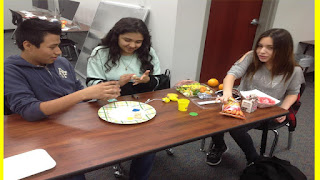 Aside from the fun of completing a Maker Challenge, I also look for ways to embed teachable moments. For the Squishy Circuits challenge, students had lots of fun building circuits of out Playdough, but they also were learning some basic skills about how electricity flows. One of the concepts was the idea that they could build a short circuit-that electricity flows through the path of least resistance if the conductive dough pieces were touching instead of flowing through the wires.
Students also had opportunities to try out a motor, different battery sizes as well as both alligator clips and wires. Having a variety of materials on hand encouraged students to experiment and innovate. This only added to the fun as students searched for the best combinations of batteries and cabling. The students were so engaged in the fun of building the circuits that they did not realize that they were learning!
8. Reflect on the event and seek improvements
Overall, the two Teen Tech week events were a success, but there are still areas that could be improved. For the Squishy Circuits, it would have been more effective to have sections of wire precut before students arrived for first lunch. This would have given students more chances to innovate their designs. For second lunch, we were able to have enough wire precut for students to start right away. This gave students more time and they developed some pretty innovative designs-they made a snake, an ugly snowman, and a fish!
It also would have given students more confidence if there were some prototypes laid out to help them start thinking about their designs. Next time, I would like to employ my student aides to help develop more prototypes and have their work laid out on the tables for event participants to see. This would also help to prepare student aides to have more confidence to teach once they had already developed some working prototypes.
Follow me on Twitter:@brian_librarian
Follow the Golden Eagle Library
On Twitter: @GoldenEagleLMC
On Instagram: @Goldeneaglelmc
Contact me by email: bjohnson3@sdale.org
This year's Teen Tech Week has been a great celebration. Here is a top 8 list of ways to have a successful Teen Tech and probably the suggestions here would apply to any library event.
1. Collaborate outside of your physical building.
 For a couple of years now, I have had the privilege of staging Google Hangouts with my friend and colleague, Stony Evans at Lakeside Hot Springs High School. We have had "Lakeside Squared" Hangouts based on books, Banned Book Week, and dramatic as well as musical performances. For this year's Teen Tech Week, we decided to hold a Maker show and tell Hangout. Our students took turns sharing their maker creations including robots, coding, creature makeup and a windmill.
2. Seek out different demographics.
Our libraries need to be safe places for all of our patrons and our programming should reflect that. The Squishy Circuits session we held on Friday during lunch was a big hit with some of our male students who are typically "too cool" for library programs. I am not sure if it was the electricity, or the play dough, or the combination of both that drew them in for this event.
3. Hold a prize giveaway.
Maybe this is a given at this point, but part of drawing in a larger crowd to library events is to give away candy and prizes. For the Squishy Circuits event, we gave away a couple pairs of headphones, some candy and fancy pens. They were a hit!
4. Invite your staff to events.
 Since most of our students ride a bus to school, staying after school is not an option. As a result, most of the programming I present is either before school or at lunchtime. This year, I have made it a point to invite both staff and students to events that traditionally have targeted students. For the Squishy Circuits maker challenge on Friday, I had some teachers attend and build the circuits right along with students. (Thanks to Mr. Scott and Mr. Stallings for participating!) It provides a great opportunity for teachers and students to interact outside of the classroom.
5. Collaborate with your teaching peers to present programming-look for ways to get them involved.
 One reason why Teen Tech week was so successful was the help and support I received from my faculty to develop the event. Our Family and Consumer Science teacher, Mrs. Coston, also let me borrow her kitchen to mix up the non conductive Playdough that was needed for the Squishy Circuits.One of our instructional assistants Mr. Lara took pictures of the Maker Hangout and Squishy Circuits events. He also kept participants well supplied with materials during the Squishy circuits event on Friday.
 6. Collaborate with student aides as coaches/tech mentors

7. Subtly embed learning in the event.
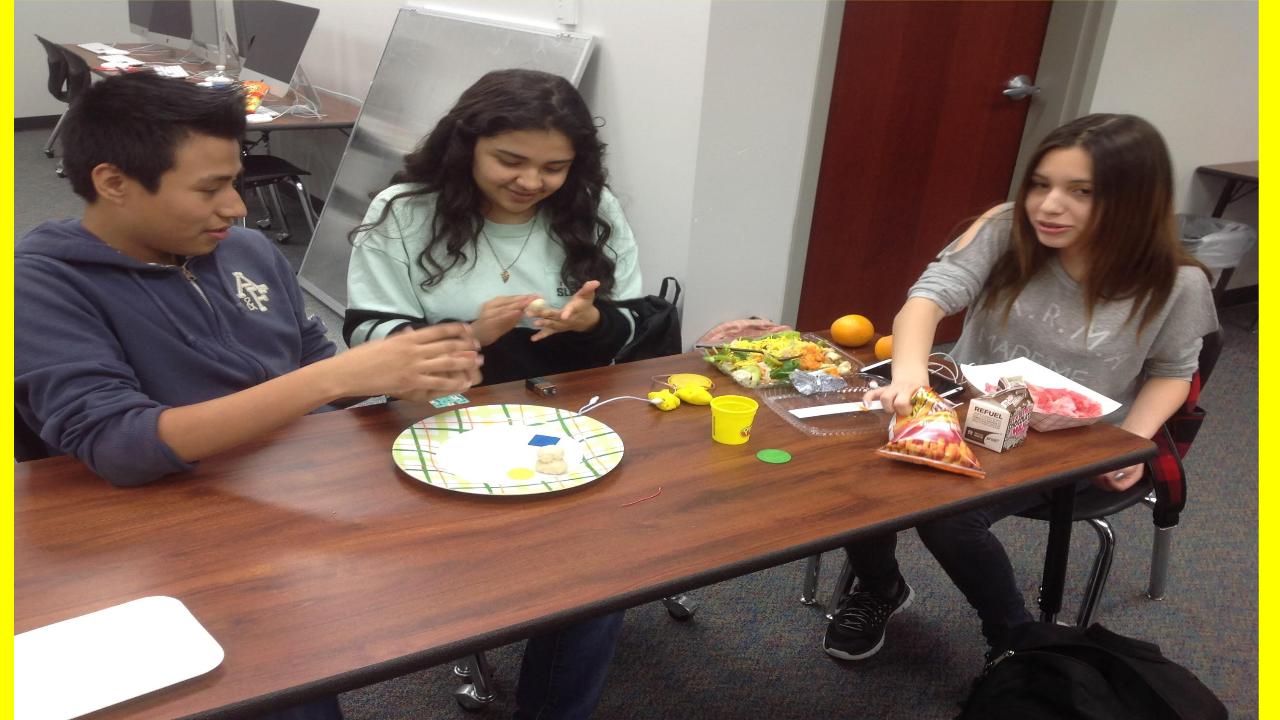
Students also had opportunities to try out a motor, different battery sizes as well as both alligator clips and wires. Having a variety of materials on hand encouraged students to experiment and innovate. This only added to the fun as students searched for the best combinations of batteries and cabling. The students were so engaged in the fun of building the circuits that they did not realize that they were learning!
8. Reflect on the event and seek improvements
Overall, the two Teen Tech week events were a success, but there are still areas that could be improved. For the Squishy Circuits, it would have been more effective to have sections of wire precut before students arrived for first lunch. This would have given students more chances to innovate their designs. For second lunch, we were able to have enough wire precut for students to start right away. This gave students more time and they developed some pretty innovative designs-they made a snake, an ugly snowman, and a fish!
It also would have given students more confidence if there were some prototypes laid out to help them start thinking about their designs. Next time, I would like to employ my student aides to help develop more prototypes and have their work laid out on the tables for event participants to see. This would also help to prepare student aides to have more confidence to teach once they had already developed some working prototypes.
Follow me on Twitter:@brian_librarian
Follow the Golden Eagle Library
On Twitter: @GoldenEagleLMC
On Instagram: @Goldeneaglelmc
Contact me by email: bjohnson3@sdale.org
Sunday, July 3, 2016
Reverse Modeling: Teaching with Nonexamples
I have a confession to make, I love Google Hangouts. In past years, I have held Hangouts with authors and about books (both banned and not), in both English and Spanish, with experts in their field and some performance based Hangouts.
Last year, I held some Mystery Hangouts with classes in the Caribbean, Sweden, Canada and South America for students in the Advanced Placement Geography course at my school. (These Hangouts were also open to all students at Lakeside JHS). They were so popular, that the AP Geography teacher approached me about holding them on a more regular basis this year.
To teach our students Google Hangout etiquette, we decided to try start with a mock Mystery Hangout. I called the class on Hangout from the library while they stayed in their classroom down the hall using my alter ego, Mr. Bond. We employed one of my favorite instructional strategies teaching with nonexamples; in the case of this Mystery Hangout etiquette lesson, what not to do on a Google Hangout.
 For this Hangout, I sketched out a fake class on the whiteboard behind me complete with distracted students. We set it up in the Professional Library area of the library with an American Flag in the background so as not to disguise my location for a Mystery Hangout.
Throughout the Hangout, I pretended that I could not sit still to reinforce how distracting such behavior is for participants on the other end of the webcam. I also made sure to eat potato chips and drink water while attempting to answer students' questions about my location.

Looking back on the year of Hangouts, the visit with Mr. Bond produced great dividends evidenced by students' participation in our later Hangouts. This was quite a successful year for Mystery Hangouts. We met with classes in South American, Europe (South London), British Columbia and Ontario Canada as well as Transylvania, Romania).
Since students became comfortable in what not to do, they were better prepared to successfully participate. Students were able to apply their learning to speak up, hold still, and ask the right kinds of questions during Hangouts. They were able to develop deeper questions for those who participated in Hangouts with them which in turn, produced higher quality discussions. Being that this is an election year, we had some fascinating discussions after the Mystery portion of the Hangouts with our peers on other continents about their views of American political candidates.
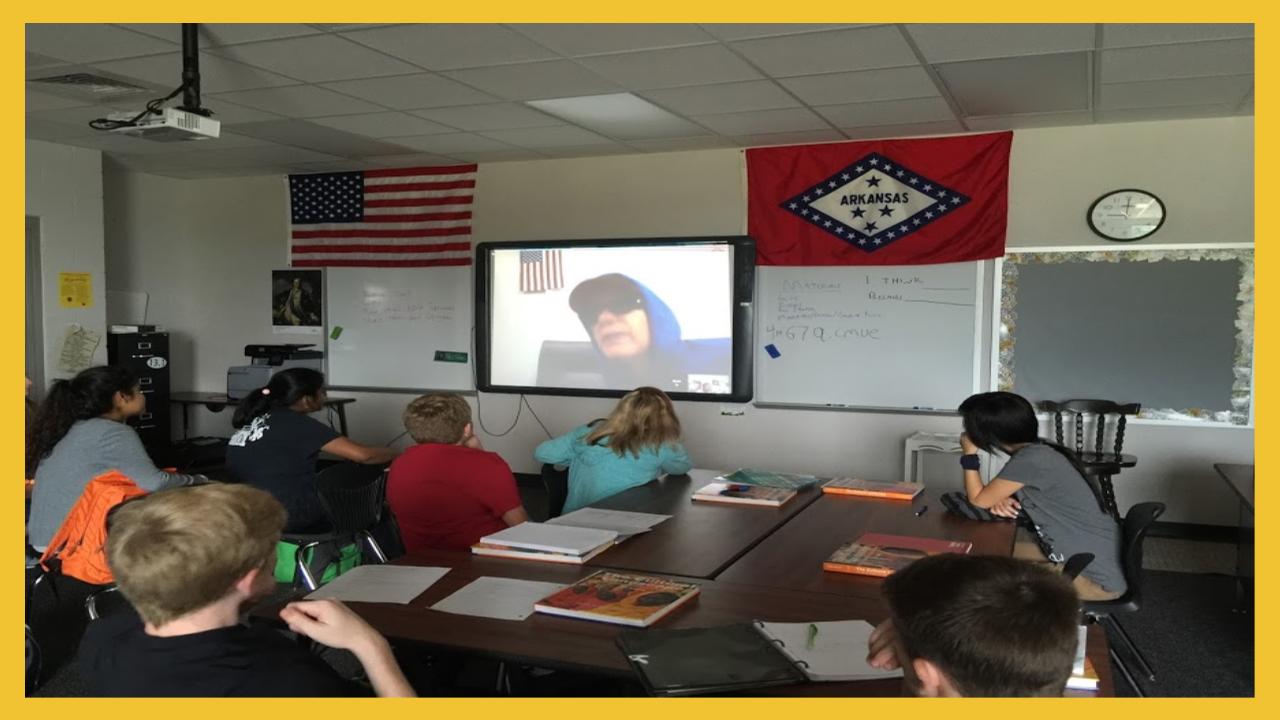 Beyond deeper discussion, it also changed students' view of themselves and their roles in the world. By holding a Hangout once a month with this class throughout the year, Hangouts became a norm of their education, and as a result, students started to view themselves as a part of the global community.
We often hear that as educators we are preparing students for a world with jobs that have not yet been created. Since we know our world is only becoming more connected, it makes sense to build in Hangouts as a norm of our instructional program. Why not use regular Hangouts to prepare our students for their even more connected futures?
Follow me on Twitter: @brian_librarian
Follow the Golden Eagle Library!
On Twitter: @GoldenEagleLMC
On Instagram: Goldeneaglelmc
Contact me by email: bjohnson3@sdale.org
Last year, I held some Mystery Hangouts with classes in the Caribbean, Sweden, Canada and South America for students in the Advanced Placement Geography course at my school. (These Hangouts were also open to all students at Lakeside JHS). They were so popular, that the AP Geography teacher approached me about holding them on a more regular basis this year.
To teach our students Google Hangout etiquette, we decided to try start with a mock Mystery Hangout. I called the class on Hangout from the library while they stayed in their classroom down the hall using my alter ego, Mr. Bond. We employed one of my favorite instructional strategies teaching with nonexamples; in the case of this Mystery Hangout etiquette lesson, what not to do on a Google Hangout.
 For this Hangout, I sketched out a fake class on the whiteboard behind me complete with distracted students. We set it up in the Professional Library area of the library with an American Flag in the background so as not to disguise my location for a Mystery Hangout.
 Throughout the Hangout, I pretended that I could not sit still to reinforce how distracting such behavior is for participants on the other end of the webcam. I also made sure to eat potato chips and drink water while attempting to answer students' questions about my location.

Looking back on the year of Hangouts, the visit with Mr. Bond produced great dividends evidenced by students' participation in our later Hangouts. This was quite a successful year for Mystery Hangouts. We met with classes in South American, Europe (South London), British Columbia and Ontario Canada as well as Transylvania, Romania).
Since students became comfortable in what not to do, they were better prepared to successfully participate. Students were able to apply their learning to speak up, hold still, and ask the right kinds of questions during Hangouts. They were able to develop deeper questions for those who participated in Hangouts with them which in turn, produced higher quality discussions. Being that this is an election year, we had some fascinating discussions after the Mystery portion of the Hangouts with our peers on other continents about their views of American political candidates.
We often hear that as educators we are preparing students for a world with jobs that have not yet been created. Since we know our world is only becoming more connected, it makes sense to build in Hangouts as a norm of our instructional program. Why not use regular Hangouts to prepare our students for their even more connected futures?
Follow me on Twitter: @brian_librarian
Follow the Golden Eagle Library!
On Twitter: @GoldenEagleLMC
On Instagram: Goldeneaglelmc
Contact me by email: bjohnson3@sdale.org
Subscribe to:
Posts (Atom)