Showing posts with label @goldeneagleLMC. Show all posts
Showing posts with label @goldeneagleLMC. Show all posts
Sunday, May 31, 2020

Sunday, May 24, 2020
Silent Book Club: An Easy Way to Provide Virtual Services During Crisis (or Really anytime!)
During the COVID-19 Crisis, we have certainly had to shift our instructional practices to meet the needs of our learning community in these crazy times! My initial interest in Silent Book Clubs came from hearing from my colleague Ginny Poepsel (vpoepsel@sdale.org) in Springdale that a student had requested a time/space online to just be in the presence of others to read.
After reading Cassandra Barnett's message to the Arkansas Association of Instructional Media about the Silent Book Club a few days later, I decided to give it a try. The first session of the Lakeside Silent Book Club was held on Zoom during a week when our virtual book club was to meet with the author of the book we were reading. When the author cancelled, I decided to give the Silent Book Club a try.
I promoted the event on the LJHS Library social media through some posts including a media found below:

How It Went
For our initial Silent Book Club, we had four participants. Although no student participants attended, four staff members attended. Probably the most awkward thing about the Silent Book Club, was understanding the norms. Since it was a "silent" book club, it was a bit unclear for the participants when, if at all, it was okay to talk. I opened the meeting by asking participants to hold up the book they were reading on screen so other participants could see what was being read.
To accommodate the silence, we ended up using Zoom's chat feature to share briefly about the books we were reading. One positive of the experience was that there was a definite reading "flow" that took place. Our meeting was originally scheduled from 2-3pm, however each member of the group was so engaged in their book, that I did not end the meeting until almost 3:15. (Likely if I had not said anything, I think the meeting could have gone on even longer!)
Future Implementation
Even though no students attended, I would still say that the goal of providing a safe space to read online was met. I think if I had advertised the meeting more and as students get used to this opportunity as a regularly scheduled library event, its popularity will continue to grow.
As I look towards the uncertainty of the fall, whether we continue with virtual instruction or will be back in face to face school, I would definitely be interested in holding Silent Book Club meetings in the future. Try it out virtually, or in your physical library space and please let me know how it goes!
Contact me on social media: @GoldenEagleLMC
@Brian_librarian
Bjohnson3@sdale.org
Wednesday, July 25, 2018
Invention Literacy Challenge
It is easy to get nostalgic over the summer about where the library program has been and where it will go in the future. Looking back on this past school year, it started with a summer challenge at a training. Where that challenge ended up was surprising and opened up an entirely new world of possibilities.
Last summer, I attended the Arkansas Library Association (ARLA) summer conference in Little Rock, Arkansas. In addition to having the privilege of presenting and renewing some professional contacts, I also got to learn about a concept that was new to me from the keynote speaker Colleen Graves. She shared with us about a concept called Invention Literacy.
 At it's core, Invention Literacy asks students to invent and innovate, but it also asks them to chronicle their journey of learning. They are to do this through a variety of means including research as well as keeping a journal of their successes and failures as they build, innovate and invent. At the end of her last keynote, Colleen Graves challenged us to take one piece of learning from the ARLA conference. She asked us to write it down and store it somewhere we could refer to during the year. Her challenge was to implement that one piece of new learning from the conference in the upcoming year.
I selected the topic of Invention Literacy with the goal of collaborating on at least one Invention Literacy project during the 2017-18 school year. I wrote down the term Invention Literacy on a post-it note and stored it in the top pocket of my backpack.
As I returned for the new school year, I began sharing my learning with my teachers and proposing some ways we could implement Invention Literacy. Additionally, I also loaned out some maker space materials to teachers as a way for them to begin to see the power of Invention Literacy and how tools such as LittleBits could be used to make Invention Literacy a reality.
 In March, a new teacher approached me about a possible idea for an Invention Literacy project. She is 8th grade American History teacher and was about to start a unit on the Progressive Era. Ms. Powell proposed that students could do research about an invention from that era and create their own sample of the invention.
To start, we scoped out a handful of inventions of the time including the airplane, elevator, telegraph and railroad. Our essential question was: how does....(invention) work and how can I make my own version of it? In order to get students thinking in an invention mindset, I led them through two days of invention challenges with the Makey Makey.
 By the end of the third day, student groups had to make a decision about which invention from the Progressive Era they were planning to make. Even though Ms. Powell and I created a short list of possible inventions, students' creativity soon began to emerge in unexpected ways. Although there were some airplanes and telegraphs, students greatly expanded the list. Among their inventions were a paddle boat, an assembly line, and a number of medicines which were created during the Progressive Era.

Three other amazing inventions were a teaching tool for children who could not go to school since they were already working, a vacuum cleaner, and a vending machine.
One thing that turned out differently about the project was the way research was done. Initially, I had proposed that students would do the research into their invention's history first, before they did any building. As it turned out, we had students build for a couple of days first and then do research. This helped to build in some buy in from students are they were more motivated to research into their inventions once they had spent some time building their designs.
Advocacy
 One of the best things about this project was the advocacy piece it became for the Library program and the Maker space specifically. My administrative team asks us three questions in our springtime summative evaluation: what have you done well this year what do you want to improve on, and how can we as a building improve next year. In my summative evaluation, I shared with them about the success of the Invention Literacy project. Ms. Powell had arranged for her students to complete a gallery walk in the library where they could share their process and projects which just so happened to be going on during the time of my summative meeting. So I invited my administrators to see these students incredible work.
We also had the great opportunity to hold a Google Hangout with Stony Evans from Lakeside Hot Springs High School.in Arkansas. He is the librarian there and had been collaborating with one of his history teachers on a similar Invention Literacy project. Our students had a chance to share their projects/process with their peers from Hot Springs. The Hangout was also a wonderful chance to look into ways we can expanded Invention Literacy into the future. We saw several projects that had reinvented historical locations through designing Minecraft worlds. Among them were a slave plantation and Fort McHenry in Baltimore Harbor where Francis Scott Key had penned the Star Spangled Banner.
 Our Invention Literacy project turned out better than I could have ever imagined. It was exciting to watch student grow as inventors and innovate with their projects. I am eager to add other possibilities such as designing historical Minecraft worlds to future incarnations of this project. In fact, another 8th grade history teacher has already approached me about collaborating this year on an Invention Literacy project. I can't wait!
Follow me on Twitter: @brian_librarian
Follow the Golden Eagle Library!
On Twitter: @GoldeneagleLMC
On Instagram: GoldenEagleLMC
Contact me via email: bjohnson3@sdale.org
Last summer, I attended the Arkansas Library Association (ARLA) summer conference in Little Rock, Arkansas. In addition to having the privilege of presenting and renewing some professional contacts, I also got to learn about a concept that was new to me from the keynote speaker Colleen Graves. She shared with us about a concept called Invention Literacy.
 At it's core, Invention Literacy asks students to invent and innovate, but it also asks them to chronicle their journey of learning. They are to do this through a variety of means including research as well as keeping a journal of their successes and failures as they build, innovate and invent. At the end of her last keynote, Colleen Graves challenged us to take one piece of learning from the ARLA conference. She asked us to write it down and store it somewhere we could refer to during the year. Her challenge was to implement that one piece of new learning from the conference in the upcoming year.
I selected the topic of Invention Literacy with the goal of collaborating on at least one Invention Literacy project during the 2017-18 school year. I wrote down the term Invention Literacy on a post-it note and stored it in the top pocket of my backpack.
As I returned for the new school year, I began sharing my learning with my teachers and proposing some ways we could implement Invention Literacy. Additionally, I also loaned out some maker space materials to teachers as a way for them to begin to see the power of Invention Literacy and how tools such as LittleBits could be used to make Invention Literacy a reality.
 In March, a new teacher approached me about a possible idea for an Invention Literacy project. She is 8th grade American History teacher and was about to start a unit on the Progressive Era. Ms. Powell proposed that students could do research about an invention from that era and create their own sample of the invention.
Implementation


One thing that turned out differently about the project was the way research was done. Initially, I had proposed that students would do the research into their invention's history first, before they did any building. As it turned out, we had students build for a couple of days first and then do research. This helped to build in some buy in from students are they were more motivated to research into their inventions once they had spent some time building their designs.
Advocacy

We also had the great opportunity to hold a Google Hangout with Stony Evans from Lakeside Hot Springs High School.in Arkansas. He is the librarian there and had been collaborating with one of his history teachers on a similar Invention Literacy project. Our students had a chance to share their projects/process with their peers from Hot Springs. The Hangout was also a wonderful chance to look into ways we can expanded Invention Literacy into the future. We saw several projects that had reinvented historical locations through designing Minecraft worlds. Among them were a slave plantation and Fort McHenry in Baltimore Harbor where Francis Scott Key had penned the Star Spangled Banner.

Follow me on Twitter: @brian_librarian
Follow the Golden Eagle Library!
On Twitter: @GoldeneagleLMC
On Instagram: GoldenEagleLMC
Contact me via email: bjohnson3@sdale.org
Friday, May 4, 2018
Maker Space Failures
There are many posts written about successful Maker space activities. I wanted to write a post about a recent Maker space failure. One idea I have wanted to try for a long time was to build a wind tunnel. I had a roll of material that looks like lamination, but was not, and several type of tape to hold it together. I purchased some dowel rods and had a mound of donated cardboard to use for supports. We looked at pictures and models. We had all the materials and a plan; I thought we were primed for success.
 Students attempted to build a wind tunnel, and created some flying objects to test in it. Not a single object even flew! But they loved it! A group of 8 students who had not participated in our Library's Maker program came out and for the entire 30 minute block of time they build and rebuilt their flying machines-even though not a single one of their creations left the ground.
We are in the midst of testing season, teachers were asked to develop a series of fun activities for the afternoon of the last day of testing. I decided to offer the wind tunnel session one more time. A different group of students attended, and we looked at some more pictures of wind tunnels, agreed on a plan and began to build.
 Things went much differently this time. All students jumped in to create wind tunnels. There were two fans-one small circular fan and a larger box fan. Most students formed a large group and chose to use the larger box fan for their wind tunnel. One student decided to create his own design on the side using the smaller fan.
We had one student who immediately moved off to the side. She is a talented artist, and is a little shy. On her own, she sketched up a plan of what a working wind tunnel would look like.
In spite of the initial lack of success, I would definitely call the wind tunnel project a success on several levels:
1. Seeing the possibilities of making
 On the first day, 8 students who had not signed up for Maker space activity this year did. They were engaged in building flying objects for the duration. They now understand the possibilities and fun of making! I anticipate that I will see them again for upcoming Maker space activities
2. The power of student choice in making
I had originally thought that there would be one large group all working together on the same wind tunnel. I was wrong. Instead, students formed groups that worked for them. Most students did choose to work in the large group, while one student created his own wind tunnel design. The other student self selected how she would make by sketching out how she thought the wind tunnel should look. She created a "space" for herself to participate.
3. The power of failure
 The fact that our first wind tunnel project had no flying objects leave the ground helped to build resilience in the student makers. It did not deter them from continuing to try. The perceived failure of the first day, also empowered me as the instructor to rethink some components of the project and schedule to try it again. We actually started the second day's attempt by looking at the earlier failed designs.
Evaluating these failures powered our later successes!
What failures have your experienced in your Maker programs and how have they been turned into successes?
Check out our successful launch below!
Follow me on Twitter: @brian_librarian
Follow the Golden Eagle Library!
On Twitter: @GoldeneagleLMC
On Instagram: GoldenEagleLMC
Contact me via email: bjohnson3@sdale.org

We are in the midst of testing season, teachers were asked to develop a series of fun activities for the afternoon of the last day of testing. I decided to offer the wind tunnel session one more time. A different group of students attended, and we looked at some more pictures of wind tunnels, agreed on a plan and began to build.
 Things went much differently this time. All students jumped in to create wind tunnels. There were two fans-one small circular fan and a larger box fan. Most students formed a large group and chose to use the larger box fan for their wind tunnel. One student decided to create his own design on the side using the smaller fan.
We had one student who immediately moved off to the side. She is a talented artist, and is a little shy. On her own, she sketched up a plan of what a working wind tunnel would look like.
In spite of the initial lack of success, I would definitely call the wind tunnel project a success on several levels:
1. Seeing the possibilities of making
 On the first day, 8 students who had not signed up for Maker space activity this year did. They were engaged in building flying objects for the duration. They now understand the possibilities and fun of making! I anticipate that I will see them again for upcoming Maker space activities
2. The power of student choice in making
I had originally thought that there would be one large group all working together on the same wind tunnel. I was wrong. Instead, students formed groups that worked for them. Most students did choose to work in the large group, while one student created his own wind tunnel design. The other student self selected how she would make by sketching out how she thought the wind tunnel should look. She created a "space" for herself to participate.
3. The power of failure
 The fact that our first wind tunnel project had no flying objects leave the ground helped to build resilience in the student makers. It did not deter them from continuing to try. The perceived failure of the first day, also empowered me as the instructor to rethink some components of the project and schedule to try it again. We actually started the second day's attempt by looking at the earlier failed designs.
Evaluating these failures powered our later successes!
What failures have your experienced in your Maker programs and how have they been turned into successes?
Check out our successful launch below!
Follow me on Twitter: @brian_librarian
Follow the Golden Eagle Library!
On Twitter: @GoldeneagleLMC
On Instagram: GoldenEagleLMC
Contact me via email: bjohnson3@sdale.org
Monday, July 24, 2017
Stretching Out of Students' Minds with the Google A Week Contest
A couple of years ago, I attended a Google Summit in Conway, Arkansas with a group of teachers from my school. We left with a passel of ideas about how we could infuse our curriculum with Google Apps for Education. The two hour drive home featured a series of conversations casting a vision for what our school could be like if we implemented Google tools at Lakeside. Looking back on the conference, it was an event which has profoundly shaped how instruction is delivered at my school.
One of the concepts I learned about at the Google Summit was the Google A Day contest. In its original form, I would selected one of the questions from the Google A Day and use it for the Google A Week contest on my campus. The Google Question of the Week has evolved to focus on current events and curricular topics. It has become a popular addition to the daily announcement broadcast. Over time, the Google Question of the Week has become a staple of the library program.
How it works
Each Monday, a new question is posted on the daily school wide video broadcast as well as on posters throughout the school halls. Students have until Friday at the end of the school day to turn in their name, the correct answer, and the website where the answer came from on a slip of paper.
On Fridays, right before I leave for the day, I sift the answers and pile up the correct ones. Then one correct answer is selected at random as the Google a Week winner. Sometimes I will also enlist the help of a library patron who is present in the last period of the day to select the winner. The winner is announced on next week's campus wide video broadcast. Each week's winner is also entered in the Google A Week Championships (or G.A.W. CHA) which is held in the Spring each year. To read more about this event, check out this blog post about it. http://bit.ly/2eIZuHU
Frequently the questions are related to current events, topics students are studying in class or an obscure story I heard on public radio during my morning commute. I will often hear from students when they see the question-"we just talked about that in class the other day!" It ends up being a research opportunity even if they think they remember the answer since they are required to locate a web based source for their information. It also provides another opportunity for teachers and students to discuss what they are learning. This is also an easy way to document how we are supporting the school's instructional program as a library media specialist.
 Usually I will make adjustments from the original question to make it "unGoogleable". For example, I located the question: What was America's best selling book in 2016? To make this question "unGoogleable", I refocused the question to become: who was the main character of America's bestselling book in 2016?
By making this change, the question also became more difficult because students had to look into both fiction and nonfiction bestseller lists since each type of books could have characters. They also had to conduct deeper inquiry to determine who the main character of that work was.
Adjusting questions this way reinforces the research skills I want to cultivate in my students. Through the process of locating the answer, students are building reading stamina. Students sometimes have to look at multiple websites and go beyond just reading the "abstract" on their initial search. By doing this, they are building reading and research stamina that will help them to engage in more complex texts.
Instead of just typing in the question and locating the answer, I encourage the students to "cut the question like a steak." What I mean by this is to cut off the "bones and fat" (the unnecessary words) which develops their skills at identifying keywords to narrow their search and further limits their search results. My goal is that my students will be so familiar and comfortable with "cutting the question like a steak" that they will transfer this skills to attack the research questions which are posed in their classes in this manner.
The Future of Google a Week
In the future, I would like to grow the Google A Week program to include more faculty participation. Historically we have a few teachers and staff members enter the weekly contest. I think it would encourage more students to participate if they felt like they were competing against their teachers!
Another way I would like to grow the program is to further integrate it with database use. Not only would it give students more experience using the databases in the contest, but I also think this would go a long way to reinforcing the use of databases as students' "go to" research resource for projects in their classes. It might require a bit more work to develop questions that could only be answered using our state funded databases, but the long term impact might make it work it.
Follow me on Twitter: @brian_librarian
Follow the Golden Eagle Library!
On Twitter: @GoldeneagleLMC
On Instagram: GoldenEagleLMC
Contact me via email: bjohnson3@sdale.org
One of the concepts I learned about at the Google Summit was the Google A Day contest. In its original form, I would selected one of the questions from the Google A Day and use it for the Google A Week contest on my campus. The Google Question of the Week has evolved to focus on current events and curricular topics. It has become a popular addition to the daily announcement broadcast. Over time, the Google Question of the Week has become a staple of the library program.
How it works
Each Monday, a new question is posted on the daily school wide video broadcast as well as on posters throughout the school halls. Students have until Friday at the end of the school day to turn in their name, the correct answer, and the website where the answer came from on a slip of paper.
On Fridays, right before I leave for the day, I sift the answers and pile up the correct ones. Then one correct answer is selected at random as the Google a Week winner. Sometimes I will also enlist the help of a library patron who is present in the last period of the day to select the winner. The winner is announced on next week's campus wide video broadcast. Each week's winner is also entered in the Google A Week Championships (or G.A.W. CHA) which is held in the Spring each year. To read more about this event, check out this blog post about it. http://bit.ly/2eIZuHU
Frequently the questions are related to current events, topics students are studying in class or an obscure story I heard on public radio during my morning commute. I will often hear from students when they see the question-"we just talked about that in class the other day!" It ends up being a research opportunity even if they think they remember the answer since they are required to locate a web based source for their information. It also provides another opportunity for teachers and students to discuss what they are learning. This is also an easy way to document how we are supporting the school's instructional program as a library media specialist.
 Usually I will make adjustments from the original question to make it "unGoogleable". For example, I located the question: What was America's best selling book in 2016? To make this question "unGoogleable", I refocused the question to become: who was the main character of America's bestselling book in 2016?
By making this change, the question also became more difficult because students had to look into both fiction and nonfiction bestseller lists since each type of books could have characters. They also had to conduct deeper inquiry to determine who the main character of that work was.
Adjusting questions this way reinforces the research skills I want to cultivate in my students. Through the process of locating the answer, students are building reading stamina. Students sometimes have to look at multiple websites and go beyond just reading the "abstract" on their initial search. By doing this, they are building reading and research stamina that will help them to engage in more complex texts.
Instead of just typing in the question and locating the answer, I encourage the students to "cut the question like a steak." What I mean by this is to cut off the "bones and fat" (the unnecessary words) which develops their skills at identifying keywords to narrow their search and further limits their search results. My goal is that my students will be so familiar and comfortable with "cutting the question like a steak" that they will transfer this skills to attack the research questions which are posed in their classes in this manner.
The Future of Google a Week
In the future, I would like to grow the Google A Week program to include more faculty participation. Historically we have a few teachers and staff members enter the weekly contest. I think it would encourage more students to participate if they felt like they were competing against their teachers!
Another way I would like to grow the program is to further integrate it with database use. Not only would it give students more experience using the databases in the contest, but I also think this would go a long way to reinforcing the use of databases as students' "go to" research resource for projects in their classes. It might require a bit more work to develop questions that could only be answered using our state funded databases, but the long term impact might make it work it.
Follow me on Twitter: @brian_librarian
Follow the Golden Eagle Library!
On Twitter: @GoldeneagleLMC
On Instagram: GoldenEagleLMC
Contact me via email: bjohnson3@sdale.org
Friday, June 24, 2016
Let's Recap App: a Powerful Incubator of Reflection
During the Arkansas Association of Instructional Media conference this spring, I heard from Joyce Valenza, one of my library heroes. One of the ideas that has stuck with me from her presentations was the need to publicize the library program with more than just usage statistics. She proposed that including student feedback in library reports could deepen students learning through reflection and provide powerful documentation about the impacts of the library program on their learning.
Recently, while I was discussing authentic reflections with one of my colleagues, Justin Hart, he mentioned an app called (Let's) Recap. Mr. Hart joked that he would keep mentioning it until one of his colleagues went out and tried it. I took him up on his offer and try it out with my student library aides this spring.
Let's Recap is available on the Apple Store or it can be accessed on a computer. (https://app.letsrecap.com/) Students can access the app either with their email, or by entering a class pin. For my students, I had them enter a pin.

For this experiment, I wrote up a few reflective questions for my student library aides to answer about what they had learned working in the library this year. Initially, I gave them the option to either write down their answers and submit them or complete a video reflection using Let’s Recap. I anticipated that some student aides would volunteer to share their reflective thoughts on camera using the Recap app. I was wrong. Instead, every student submitted written responses to the reflective questions.
Since the written responses were limited and lacked depth, the next day I rethought this reflection activity, and decided to give them another opportunity. I rewrote some of the questions and required students to complete their reflection on their learning using the Recap app.

I was pleasantly surprised by not only the amount of feedback students' Recap presentations provided, but by the depth of their reflective thoughts. Some aides focused on the skills they had learned working in the library this year such as shelving books, time management, or ways they had built their customer service skills. Other described the activities they had done such as working on Genius Hour projects in the Maker Lab, or the coding they did of Finch Robots and to build video games.

One student's reflection was particularly poignant. This student was one of the more shy student aides this year. Their reflection focused less on activities, or skills that were developed, and more on how they had grown as a person through working in the library. In the Recap reflection, they described how they had "learned how to talk with people" and "be more social" working in the library this year.
Some things I liked about the Let's Recap app:

Recently, while I was discussing authentic reflections with one of my colleagues, Justin Hart, he mentioned an app called (Let's) Recap. Mr. Hart joked that he would keep mentioning it until one of his colleagues went out and tried it. I took him up on his offer and try it out with my student library aides this spring.
Let's Recap is available on the Apple Store or it can be accessed on a computer. (https://app.letsrecap.com/) Students can access the app either with their email, or by entering a class pin. For my students, I had them enter a pin.

For this experiment, I wrote up a few reflective questions for my student library aides to answer about what they had learned working in the library this year. Initially, I gave them the option to either write down their answers and submit them or complete a video reflection using Let’s Recap. I anticipated that some student aides would volunteer to share their reflective thoughts on camera using the Recap app. I was wrong. Instead, every student submitted written responses to the reflective questions.
Since the written responses were limited and lacked depth, the next day I rethought this reflection activity, and decided to give them another opportunity. I rewrote some of the questions and required students to complete their reflection on their learning using the Recap app.

I was pleasantly surprised by not only the amount of feedback students' Recap presentations provided, but by the depth of their reflective thoughts. Some aides focused on the skills they had learned working in the library this year such as shelving books, time management, or ways they had built their customer service skills. Other described the activities they had done such as working on Genius Hour projects in the Maker Lab, or the coding they did of Finch Robots and to build video games.

One student's reflection was particularly poignant. This student was one of the more shy student aides this year. Their reflection focused less on activities, or skills that were developed, and more on how they had grown as a person through working in the library. In the Recap reflection, they described how they had "learned how to talk with people" and "be more social" working in the library this year.
Some things I liked about the Let's Recap app:
- Ease of use-it is not difficult to set up reflection opportunities using the app or to review student responses.
- It provides more authentic feedback opportunities since students are talking out their thoughts. This proved more effective for some students. For others, the lack of structure provided through oral explanation led to more of a "stream of consciousness" approach.
- Some students shared about class learning and skills they developed, while others shared about personal growth.
- Students were in some cases more frank and honest when they talked out their reflections compared to when they reflected on paper.
5. Let’s Recap is free and works as an iPad app, or on computers.
As I look forward to the 2016-17 school year, I will definitely be including Let’s Recap as one of the apps that will be shared through the Digital Diner technology trainings I offer for my staff. It will be one of the first apps I share this fall. It is a great, easy to use reflective tool that can powerfully display students' reflections on their learning.
Follow me on Twitter: @brian_librarian
As I look forward to the 2016-17 school year, I will definitely be including Let’s Recap as one of the apps that will be shared through the Digital Diner technology trainings I offer for my staff. It will be one of the first apps I share this fall. It is a great, easy to use reflective tool that can powerfully display students' reflections on their learning.
Follow me on Twitter: @brian_librarian
Follow the Golden Eagle Library!
On Twitter: @Goldeneaglelmc
On Instagram: @Goldeneaglelmc
Contact me by email: bjohnson3@sdale.org
Monday, September 14, 2015
Maker Challenges
 I am developing a Maker Space in the Library this year. I will also be co-leading a Maker Club with another teacher that will be held on alternating Fridays. My administration has encouraged me to seek out ways to tie Maker activities to the curriculum.
  To build up interest in the Maker Space, I held a Maker Challenge last Friday in the Library during both of our lunch periods. Since the toys for the new Star Wars Movie came out on that day, I selected a Star Wars related challenge. Participants were to pick a Star Wars character or ship to construct. For the challenge, I borrowed my children's Lego bricks and printed off several images of Star Wars ships and characters.
The session was a hit! About fifteen students in each lunch attend as well as two teachers. The teachers and students created Darth Vader as well as a Tie Fighter, an AT-ST Walker, an Imperial Star Destroyer, two AT-AT Walkers, and a Speeder bike.
 I handed out prizes for the best ship in each lunch as well as best character created. Into the next week, several teachers and students have stopped by the library inquiring about when the next Maker Challenge will be held.
Another part of the success of the first Challenge was that our broadcast teacher used it as an opportunity to train one of his students in video production. The student attended the second session of the Maker Challenge, and turned his footage into a video about the Maker Challenge. This video gave the library Maker Space some great publicity and appeared on the all school broadcast announcements the following week.

I look forward to holding another Maker Challenge next month. Some buzz has been created about the Makerspace, the challenge now is to build on that and connect it with some curricular projects!
Keep up with the Golden Eagle Library on Twitter and Instagram: @GoldenEagleLMC
#ljhslmc
Follow me on Twitter: @brian_librarian
Tuesday, September 1, 2015
Diving into Maker Spaces with Both Feet
With the opening of the new school year, I took the plunge into the world of maker spaces. My school has a tradition of making our first back to school meeting a fun one. Last year, we held a zombie scavenger hunt around the building with GPSs. This past June when I met with the administration for my yearly evaluation, I proposed opening a maker space in my library workroom. During that meeting, they encouraged me to pursue the maker space and also to consider how maker concepts could be incorporated into the curriculum and within our academic teams.
With this challenge as a backdrop, I worked with a colleague to set up a two hour professional development session for my teachers where they would learn what the maker movement is and understand the possibilities it holds. My assistant principal and I then surveyed our options and made plans for how we could empower teachers to create their first maker projects.
 Although my interior decorating skills are negligible, I had the idea the night before to layout maker "center pieces" on all of the tables where staff were seated. This proved to be an effective way to show my colleagues the broad range of materials and possibilities that fit under the maker umbrella.
 One of the session goals was to have our academic teams create a project that was related to a goal their team had, their team name (which they were selecting at the first part of the session), or a part of the vision for their team. Since some of the teams had not met together before, we had to plan in some extra time in the session so that they could get to know one another and collaborate towards this goal. This ended up being one of the best part of the session and helped to set our teams up to succeed in creating some pretty impressive maker projects in a short period of time.
 After a short review of several of the sessions' maker project options which included duct tape projects, Legos, action figures, crafts, green screen and stop action video productions, our teachers got to work. As in most maker projects, time was the enemy. Nonetheless, the projects developed by the staff were impressive! There were several videos including a stop action, and a green screen production, as well as a presentation where an Ironman doll was repurposed as an poster advertisement for the goals of one academic team. Our session concluded with a chance for each team to present their projects and tie in the goals and vision of their teams.
 There were several takeaways from this two hour session. First, as one teacher new to our staff comment that this was " the most fun" he had ever had at an opening staff meeting. Having fun was also a catalyst for doing the work of teaming and clarified each team's vision and goals for the year. My teachers also saw the "can do" spirit of the maker movement first hand and now see its possibilities for their students. As one teacher put it, maker projects are "so practical, (we) can do them in my classroom." (with the supplies on hand) In terms of what I would do different, I would seek to make more direct connections with teachers' content. I had a few maker projects on hand to show teachers and briefly referred to how they might fit in with different content disciplines, but I wish there had been more time in the session to flesh this out.

The challenges from here are to build on the momentum of this session as the school year begins. Several teachers have already donated materials and connected me with community resources to obtain supplies for our maker space. I hope to be able to blog more in the future about how I have worked with teachers and students this year to incorporate maker projects directly into their curriculum and their lives.
With this challenge as a backdrop, I worked with a colleague to set up a two hour professional development session for my teachers where they would learn what the maker movement is and understand the possibilities it holds. My assistant principal and I then surveyed our options and made plans for how we could empower teachers to create their first maker projects.
 Although my interior decorating skills are negligible, I had the idea the night before to layout maker "center pieces" on all of the tables where staff were seated. This proved to be an effective way to show my colleagues the broad range of materials and possibilities that fit under the maker umbrella.
 One of the session goals was to have our academic teams create a project that was related to a goal their team had, their team name (which they were selecting at the first part of the session), or a part of the vision for their team. Since some of the teams had not met together before, we had to plan in some extra time in the session so that they could get to know one another and collaborate towards this goal. This ended up being one of the best part of the session and helped to set our teams up to succeed in creating some pretty impressive maker projects in a short period of time.
  After a short review of several of the sessions' maker project options which included duct tape projects, Legos, action figures, crafts, green screen and stop action video productions, our teachers got to work. As in most maker projects, time was the enemy. Nonetheless, the projects developed by the staff were impressive! There were several videos including a stop action, and a green screen production, as well as a presentation where an Ironman doll was repurposed as an poster advertisement for the goals of one academic team. Our session concluded with a chance for each team to present their projects and tie in the goals and vision of their teams.
 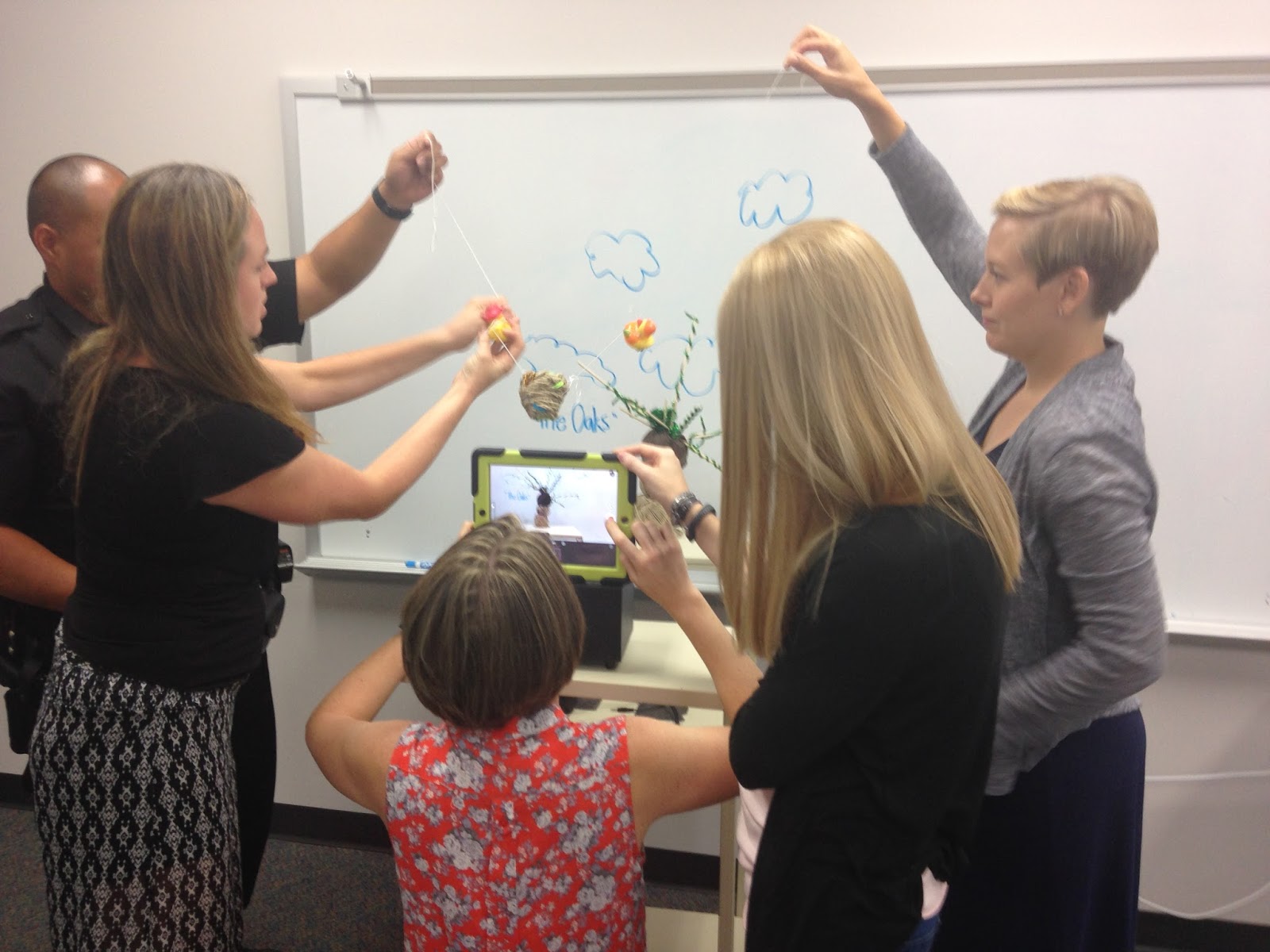 There were several takeaways from this two hour session. First, as one teacher new to our staff comment that this was " the most fun" he had ever had at an opening staff meeting. Having fun was also a catalyst for doing the work of teaming and clarified each team's vision and goals for the year. My teachers also saw the "can do" spirit of the maker movement first hand and now see its possibilities for their students. As one teacher put it, maker projects are "so practical, (we) can do them in my classroom." (with the supplies on hand) In terms of what I would do different, I would seek to make more direct connections with teachers' content. I had a few maker projects on hand to show teachers and briefly referred to how they might fit in with different content disciplines, but I wish there had been more time in the session to flesh this out.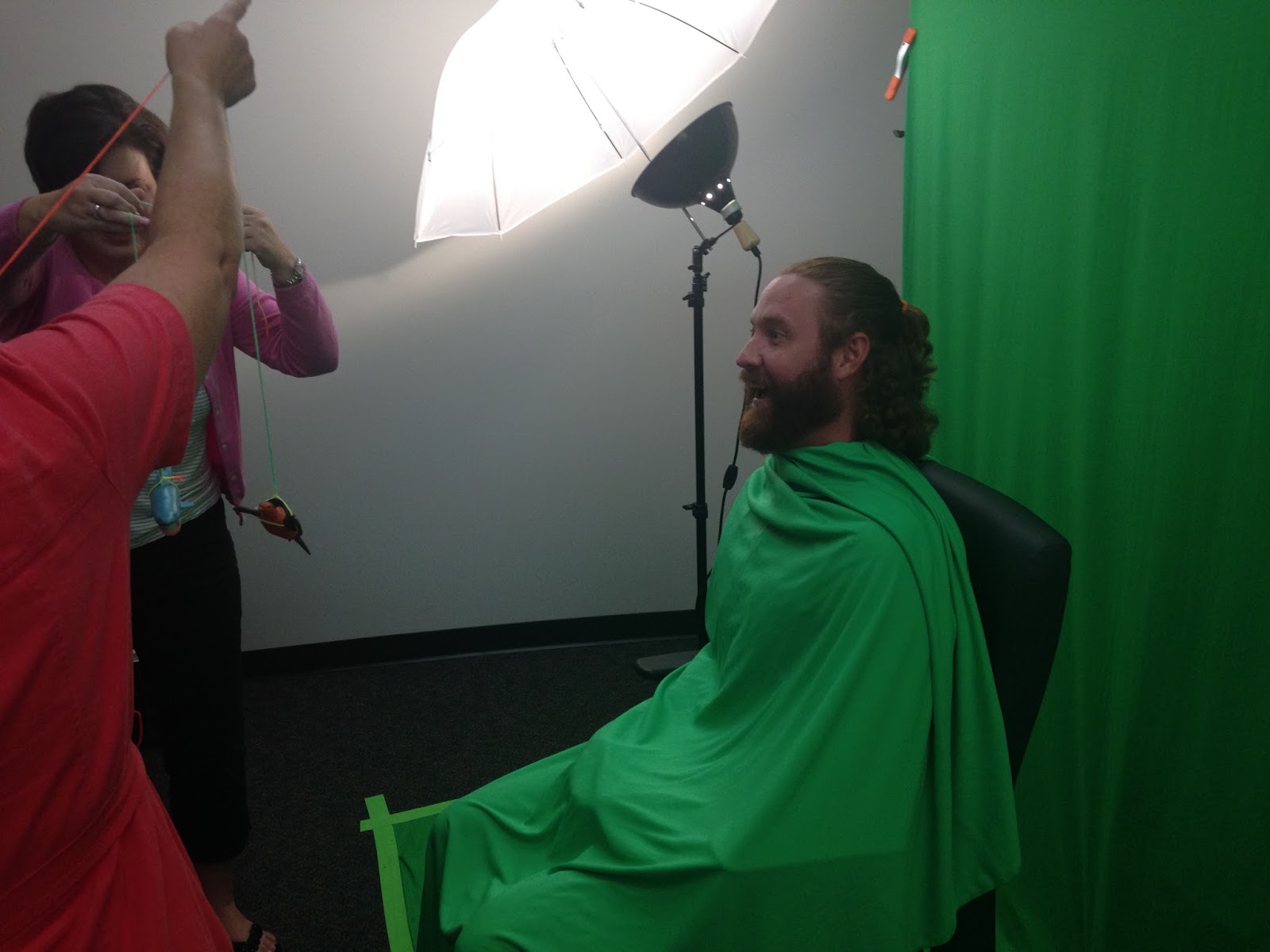
The challenges from here are to build on the momentum of this session as the school year begins. Several teachers have already donated materials and connected me with community resources to obtain supplies for our maker space. I hope to be able to blog more in the future about how I have worked with teachers and students this year to incorporate maker projects directly into their curriculum and their lives.
Monday, July 13, 2015
Is School Hard Enough?
My wife is currently in graduate school to become an instructional facilitator. As she has pursued her studies, we have had great conversations about instructional technology. I have also come across several "hey honey, you really need to read this" texts from her coursework. One of the most intriguing is a book called Mindset by Carol Dweck.
If you are not familiar with Mindset, it is a fascinating work about how we mentally frame what we are capable of accomplishing. Typically, people either fall into one of two categories: fixed mindset-i.e. my abilities are fixed and my life challenges can profoundly limit my capabilities, or a growth mindset: my abilities are not fixed and the sky is the limit for what I might do with those abilities.
I recently saw the growth mindset at work in this year's Google A Week Championships, or G.A.W.Cha (Gotcha).
Two years ago I attended the Google Conference in Conway, Arkansas. One of the ideas that was shared there was a Google A Week contest. Since returning from that conference, I have held a Google A Week Contest for my students.In this contest, a question is posted in the library each week and on the school wide video broadcast for students to develop their research skills. Often these questions come from current events and require students to research a question using Google, locate the correct answer and the web address where it came from, and turn in the fruits of their research on a piece of paper. Each Friday right before I go home for the weekend, I sort through student answers and randomly select one of the students who submitted a correct response to win a chocolate bar.
This is the second year in a row that we have hosted the Google A Week Championship (or G.A.W. Cha-Gotcha) in the library near the end of the school year. There is an open invitation for any of the Google A Week Contest winners to come in at lunch and compete against the other winners to be the overall Google Champion at Lakeside. Last year, I selected about 5 pretty challenging questions and about 10 students participated.
This spring, I heard about a way to combine multiple Google Apps for Education from my colleague Brooke Higgins. She mentioned learning about this on a technology podcast that I never did locate that had a presenter from Australia. (Sorry, Brooke :) ) I decided to try out this Multiple Google App approach for this year's Google A Week Championships.
 To accomplish this, I created a series of questions where students had to identify a landmark or location on Google Earth and then conduct further research with the Google Search engine to find the answers. I hooked up a laptop with Google Earth on it to each of the 7 screens in the library and gave the students a Chromebook with which to complete further research and submit their answers.
This opportunity was better attended then last year as we had 13 participants. With some help from my assistant, about 30 students were recruited to watch the Championships during both lunches.
In a word, this year's Google A Week Championships were fascinating to watch. They were fascinating because of the diversty of student participants. There were students whose schedules are filled with advanced courses, average students, as well as ESOL learners and one student from the self contained special education classroom.
Another point of fascination was the way students worked to answer the questions. It was silent and they were all completely focused. In fact, they were so focused, that when the bell rang for the end of lunch, no one moved! Finally, after about 10 minutes, I told the student partcipants that they would have 5 more minutes and then I would write them a pass on to their next class.
 At one point during the contest, one of the spectators got up and asked me if he could join in because as he put it: "it looks hard." That's right, it was of interest to him because it looked difficult! So I gave him the opportunity to participate.
My experiences and the feedback I got from students during G.A.W. Cha this year got me thinking about what changes we may need to make to the types of extension activities we plan for our students. I am not advocating that as teachers we need to add extensions in the form of supplemental problems, or paragraphs-that is simply not very motivating.
What if instead we planned more activities that were both very challenging, and motivating at the same time? Admittedly, the questions in this year's G.A.W. Cha were hard; and maybe too difficult. (the highest overall student score was 7/10) But inspite of that, not one student complained that it was too hard or made excuses and no one gave up. As I mentioned before, a spectator actually asked to join up for that very reason-it looked like a difficult task, so they were motivated to try.
The level of difficulty did not stop the students in the Championships from getting into such a flow with the activity that when the bell rang, they did not want to leave! Instead it inspired them.
What if we started with this question for developing extension/enrichment activities: how can I inspire my students to want to learn/do more with their learning through this activity/experience? I believe that would go a long way to fostering a growth mindset in our students, give them more, deep learning experiences with our curriculum and push their desire to become lifelong learners to the next level.
Follow me:
On Twitter: @brian_librarian
@GoldenEagleLMC
On Instagram: GOLDENEAGLELMC
If you are not familiar with Mindset, it is a fascinating work about how we mentally frame what we are capable of accomplishing. Typically, people either fall into one of two categories: fixed mindset-i.e. my abilities are fixed and my life challenges can profoundly limit my capabilities, or a growth mindset: my abilities are not fixed and the sky is the limit for what I might do with those abilities.
I recently saw the growth mindset at work in this year's Google A Week Championships, or G.A.W.Cha (Gotcha).
Two years ago I attended the Google Conference in Conway, Arkansas. One of the ideas that was shared there was a Google A Week contest. Since returning from that conference, I have held a Google A Week Contest for my students.In this contest, a question is posted in the library each week and on the school wide video broadcast for students to develop their research skills. Often these questions come from current events and require students to research a question using Google, locate the correct answer and the web address where it came from, and turn in the fruits of their research on a piece of paper. Each Friday right before I go home for the weekend, I sort through student answers and randomly select one of the students who submitted a correct response to win a chocolate bar.
This is the second year in a row that we have hosted the Google A Week Championship (or G.A.W. Cha-Gotcha) in the library near the end of the school year. There is an open invitation for any of the Google A Week Contest winners to come in at lunch and compete against the other winners to be the overall Google Champion at Lakeside. Last year, I selected about 5 pretty challenging questions and about 10 students participated.
This spring, I heard about a way to combine multiple Google Apps for Education from my colleague Brooke Higgins. She mentioned learning about this on a technology podcast that I never did locate that had a presenter from Australia. (Sorry, Brooke :) ) I decided to try out this Multiple Google App approach for this year's Google A Week Championships.
 To accomplish this, I created a series of questions where students had to identify a landmark or location on Google Earth and then conduct further research with the Google Search engine to find the answers. I hooked up a laptop with Google Earth on it to each of the 7 screens in the library and gave the students a Chromebook with which to complete further research and submit their answers.
This opportunity was better attended then last year as we had 13 participants. With some help from my assistant, about 30 students were recruited to watch the Championships during both lunches.

My experiences and the feedback I got from students during G.A.W. Cha this year got me thinking about what changes we may need to make to the types of extension activities we plan for our students. I am not advocating that as teachers we need to add extensions in the form of supplemental problems, or paragraphs-that is simply not very motivating.
What if instead we planned more activities that were both very challenging, and motivating at the same time? Admittedly, the questions in this year's G.A.W. Cha were hard; and maybe too difficult. (the highest overall student score was 7/10) But inspite of that, not one student complained that it was too hard or made excuses and no one gave up. As I mentioned before, a spectator actually asked to join up for that very reason-it looked like a difficult task, so they were motivated to try.
The level of difficulty did not stop the students in the Championships from getting into such a flow with the activity that when the bell rang, they did not want to leave! Instead it inspired them.
What if we started with this question for developing extension/enrichment activities: how can I inspire my students to want to learn/do more with their learning through this activity/experience? I believe that would go a long way to fostering a growth mindset in our students, give them more, deep learning experiences with our curriculum and push their desire to become lifelong learners to the next level.
Follow me:
On Twitter: @brian_librarian
@GoldenEagleLMC
On Instagram: GOLDENEAGLELMC
Friday, June 26, 2015
Book Review: Death Coming Up the Hill
 Admittedly, I was intrigued by the premise of Death Coming Up the Hill before I picked it up. After all, it is a novel in verse-haiku actually, that has the exact number of syllables of the United States’ casualties from the Vietnam War in 1968.
I was also skeptical about whether the author could tell a full story operating within the constraints of haiku poetry. The answer is emphatically yes: instead of limiting the power of the story, writing in such a format, Death Coming Up the Hill’s sparse prose packs true emotional power.
Death Coming Up the Hill tells the story of Ashe, a 17 year old junior who sees his senior classmates being drafted into the Vietnam conflict. His history teacher opens up the bitter realities of the war to him through class discussions that ultimately help him to better understand the conflicts in his own life. This novel contrasts the Vietnam War with the ongoing battles between Ashe’s parents at home. Their conflict stems from the family’s beginnings. Ashe’s parents had him out of wedlock during his father’s senior season of football at the University of Arizona. His birth builds resentment in his father who believes Ashe’s birth cost him a shot at a promising football career in the NFL.
Ashe’s parents have decided to stay together only because of their mutual love for him. Their resentment for one another is only exacerbated by her mother’s decidedly anti war stance. Her father is a staunch supporter of the war, while her mother fills her time with antiwar rallies and protests.
Much like the guerilla conflict across the globe in Vietnam, Ashe’s home life is full of landmines, ambushes, grenades and other wartime hazards that explode as his parents’ relationship continues to disintegrate. When Ashe’s mother becomes pregnant with an anti war protestor’s child, it ends any possibility of a peaceful resolution to their conflict.
Divided into chapters by the weeks of 1968, with the number of casualties each week matching the number of syllables in the chapter, Death Coming Up the Hill is a stark, poignant tale that accurately captures the tension and despair of the Vietnam period and its impact on one family.
Death Coming up the Hill is a good fit for middle grades and above. The subject matter is intense, but this easy to read novel in verse will resonate with reluctant readers and those interested in historical fiction and the Vietnam War time period.
(Cover used with the permission of the author)
Follow me on Twitter:
@brian_librarian
@GoldeneagleLMC
http://goldeneaglelibrarybookblog.blogspot.com/Monday, May 25, 2015
Value Added Hashtags?
This year, I have dabbled in using social media to promote the library program. While I have set up a Lakeside Junior High School Library Twitter page (@GoldenEagleLMC), a Library Facebook account as well as a library Instagram account, I have experienced very limited success in getting my students to integrate these library accounts into their social media diet. In fact, the number of teacher followers on this platforms has generally dwarfed the number of student followers!
 Two Fridays ago, I took a great leap forward in using social media to promote the library through hashtags. Previously, I have participated regularly in the variety of tweet chats. (If you are not familiar with tweetchats, the way they work is that you post out to the questions posed by the moderator with a hashtag (#arkedchat for example) at the end of each tweet- it is a great way to grow your PLN!)
This move forward with hashtags, all started when I got an email from one of the Spanish teachers asking if she would mind if the library was included in a photo scavenger hunt she had designed for her students in honor of Cinco de Mayo. Of course I emailed her back that I would gladly participate!
 As I read the email, it got me thinking about how I might use hashtags to promote the library through this activity. I proposed that we add a social media component to encourage students to share the photos they took during the scavenger hunt on Twitter and Instragram with the hashtag #cincodemayoljhs. The teacher agreed to share the hashtag with her students for this activity.
I created a few signs around the high traffic areas of the scavenger hunt around the school that featured the hashtag #cincodemayoljhs. While no students posted to Twitter, students did add several photos on Instagram-12 in fact, with that hashtag throughout the day. While a dozen might not seem like a lot, it meant that in each of the 7 hours of the school day, student groups were posting photos using hashtags as a part of the library program for the first time!
 The success of using hashtags in this scavenger hunt got me thinking about how hashtags could instantaneously improve student interactions with the library. What if I publicized upcoming library events on Instagram with a library hashtag? (#GoldenEagleLMC) What if I used the library hashtag to promote new books/services in the library? Would this encourage previously less interested students to participate in programs increasing our student attendance at these events, or increase circulation of library materials? A question for my fellow library/media specialists-how have you best employed hashtags to promote your libraries? I look forward to exploring these possibilities next year!
 My experiences getting students to use hashtags reminded me of when cell phones first entered into schools. One of my favorite quotes about this was: "students have them, so we might as well put them to good use!". I think that phrase definitely applies here: "if students are using hashtags on Instagram, we might as well put them to good use to promote the LJHS library program!"
Follow the Golden Eagle Library:
Instagram: GOLDENEAGLELMC
Twitter: @Brian_librarian
@GoldenEagleLMC
 Two Fridays ago, I took a great leap forward in using social media to promote the library through hashtags. Previously, I have participated regularly in the variety of tweet chats. (If you are not familiar with tweetchats, the way they work is that you post out to the questions posed by the moderator with a hashtag (#arkedchat for example) at the end of each tweet- it is a great way to grow your PLN!)
 This move forward with hashtags, all started when I got an email from one of the Spanish teachers asking if she would mind if the library was included in a photo scavenger hunt she had designed for her students in honor of Cinco de Mayo. Of course I emailed her back that I would gladly participate!
 As I read the email, it got me thinking about how I might use hashtags to promote the library through this activity. I proposed that we add a social media component to encourage students to share the photos they took during the scavenger hunt on Twitter and Instragram with the hashtag #cincodemayoljhs. The teacher agreed to share the hashtag with her students for this activity.
I created a few signs around the high traffic areas of the scavenger hunt around the school that featured the hashtag #cincodemayoljhs. While no students posted to Twitter, students did add several photos on Instagram-12 in fact, with that hashtag throughout the day. While a dozen might not seem like a lot, it meant that in each of the 7 hours of the school day, student groups were posting photos using hashtags as a part of the library program for the first time!


Follow the Golden Eagle Library:
Instagram: GOLDENEAGLELMC
Twitter: @Brian_librarian
@GoldenEagleLMC
Subscribe to:
Posts (Atom)